
Features
Everything an agency runs on
Win the client, get access to their accounts, run the work, measure local search, protect their ad spend and show them the results — in one product, with one login for you and one for them.
Win and onboard clients
From first audit to full access
Pitch with the prospect's own data, then get into every account they have with one link.
Local SEO sales reports
Nine grades, estimated traffic value and a 90-day plan from public data — with an alert when it's opened.
15 SEO audits
Business Profile, website, keyword gap, share of voice, traffic value, AI visibility, backlinks and more.
Interactive proposals
A private page from the prospect's own scan and audit, with a calculator, plans, signature and payment.
Client onboarding links
Google, Meta, TikTok, LinkedIn, Shopify and website access at the role you choose. No passwords.
Integrations
Every platform, how access is granted and what feeds your reports.
Run the agency
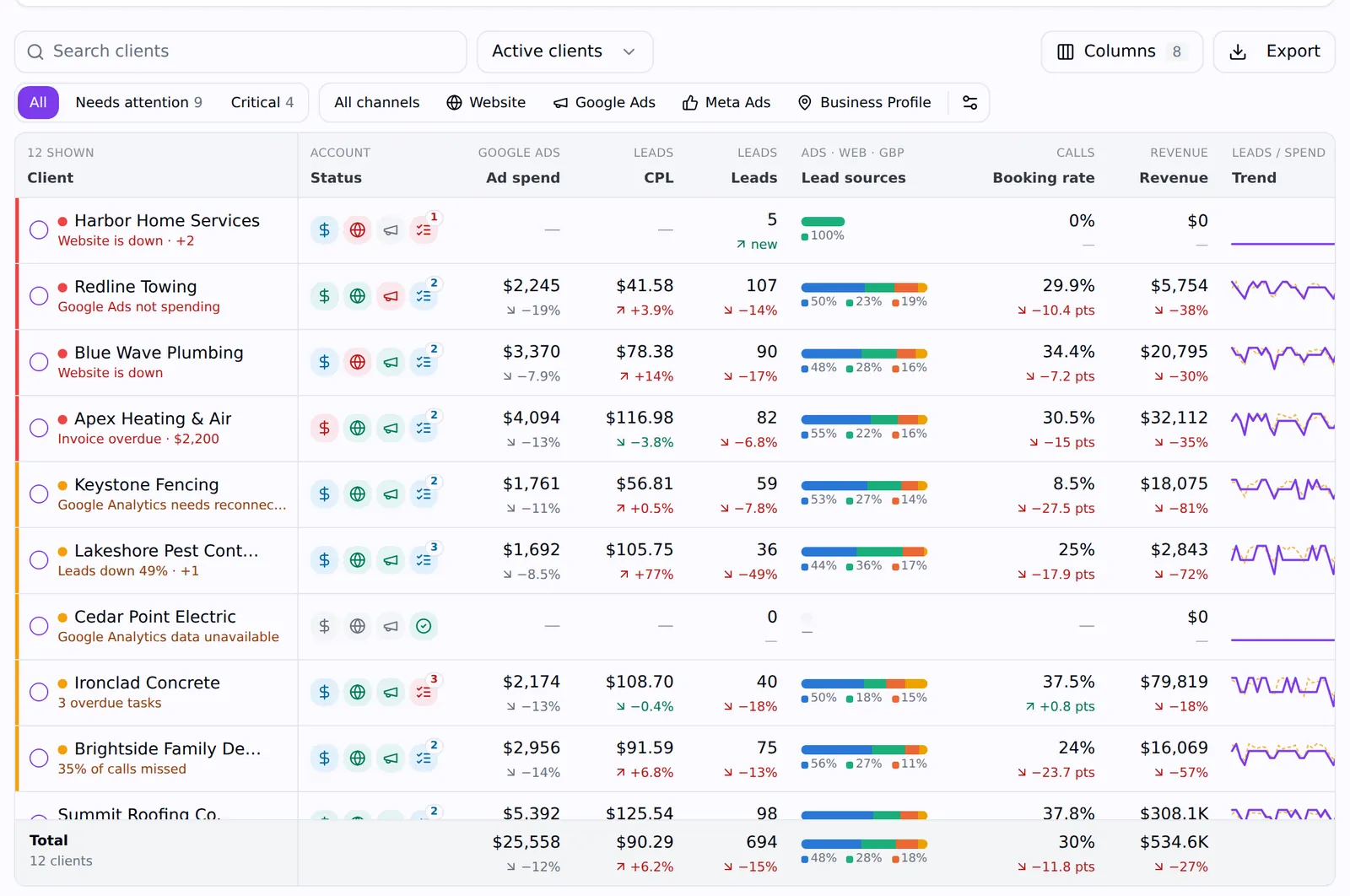
Every client, every number, one screen
Mission Control shows who needs attention first; each client's dashboard shows why.
Agency invoicing
Keep invoices and payment collection connected to the client relationship.
Agency project management
Organize delivery around client projects, assigned tasks and repeatable procedures.
Mission Control
Spend, leads, cost per lead, booking rate and revenue for every client, synced hourly.
Client dashboards
A live dashboard per client from Google Ads, Meta, GA4, Search Console and Business Profile.
Lead & revenue attribution
Every lead tagged with its click; sold jobs become ROAS and lifetime value.
Leads
A shared pipeline with sources, statuses, notes and sales the client can update.
Local SEO
Measure local search the way customers see it
Geo grids on Maps, the Local Finder and organic results, plus tracking, audits and reviews.
Geo grid rank tracker
Up to 441 points, square or circular grids, depth to the top 100.
Google Maps rank tracker
Maps and Local Finder rankings over time, with competitor alerts.
Keyword rank tracking
Weekly or monthly organic checks per client and location.
Business Profile audit
Completeness and reviews graded against the top three.
AI search visibility
Whether AI assistants recommend the business, and who they name instead.
Review monitoring
Low-star reviews flagged by scheduled checks, plus a weekly digest.
Citation auditing
Discover business listings and inspect name, address and phone consistency.
Keyword research
Investigate service queries, search metrics and competitor keyword gaps.
Local Finder tracking
Keep Maps and Local Finder sources clear when comparing local visibility.
Competitor analysis
Compare businesses with consistent scan settings and report evidence.
AI-assisted SEO analysis
Connect scan analysis and graded audits to assigned follow-up work.
Protect ad spend
See what's really happening on client sites
One tracking script: attribution, fraud signals, heatmaps, recordings and uptime.
Click-fraud protection
Repeat clickers, VPNs, datacenters and bots flagged; bad IPs blocked in Google Ads.
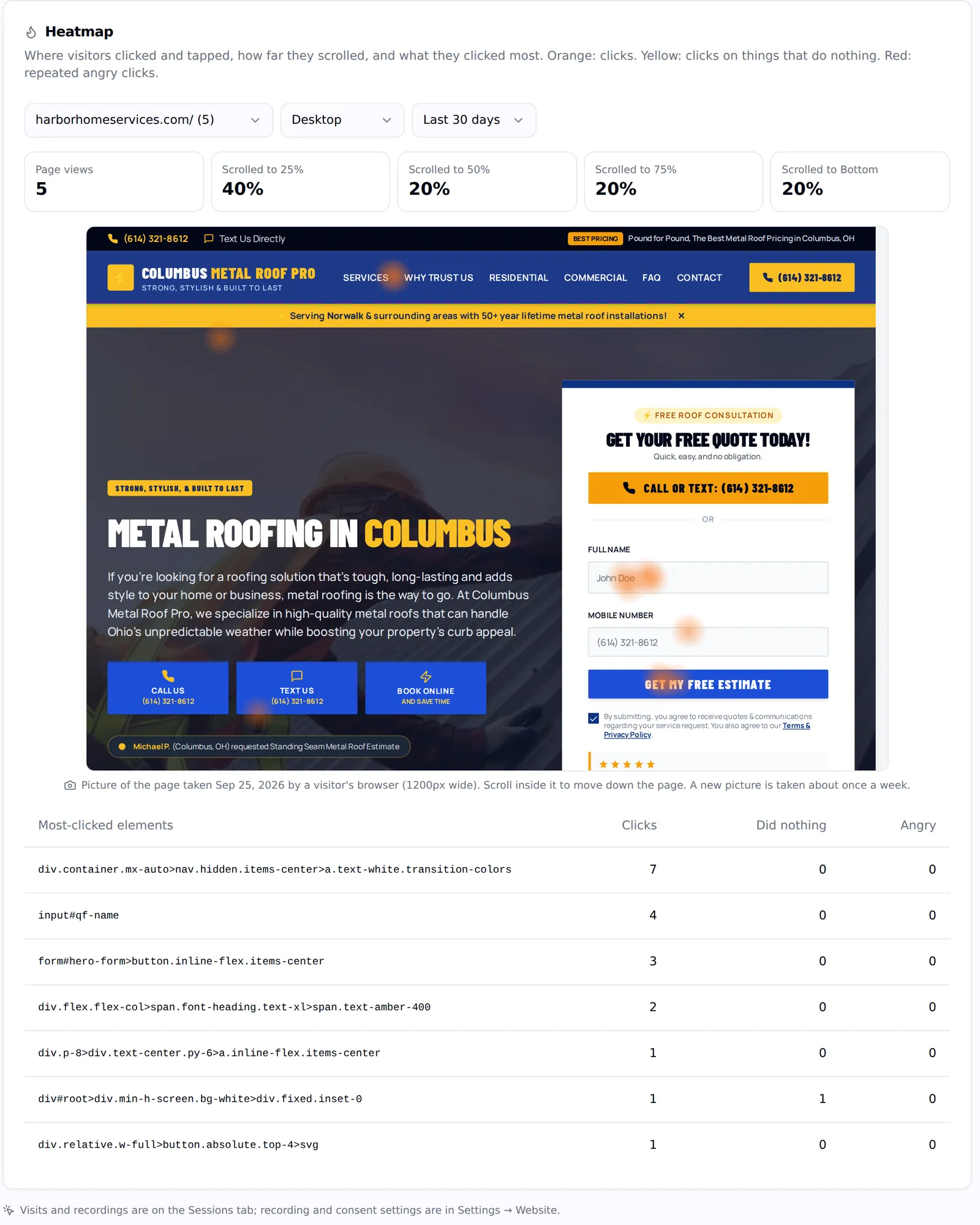
Heatmaps & recordings
Clicks, scroll and rage clicks on real page snapshots; recordings with privacy controls.
Website monitoring
A real-traffic heartbeat and 15-minute checks, with alerts.
Report to clients
Results they can see, whenever they want
Branded reports that tell you when they're read, and a portal and app they'll open.
Client reports
Progress, geo-grid and SEO reports on your branding, scheduled or shared.
Client portal
Their dashboard, leads, reports, invoices and support in one login.
LeadPulse app
Mission Control for you; dashboard, lead alerts and messages for clients.
Desktop recorder
Screen and camera recordings for Mac, shared as a branded link.
Operations
And everything that keeps the work moving
Clients & contacts
Every client with contacts, services, stage, MRR, notes, projects, tasks, tickets, invoices and documents.
Projects & tasks
Kanban boards, due dates and owners; tasks can be made visible to the client.
SOPs
Write a process once with version history, turn it into task templates, attach automations.
Automations
Twenty-six triggers and thirteen actions, with conditions, dry runs and an execution log.
Conversations
SMS and calls through your Twilio or GoHighLevel numbers, and email from your own mailbox.
Support desk
Client tickets with numbers, internal notes and SLA tracking.
Forms
Hosted forms with fifteen field types; submissions become leads with attribution.
Appointments
Event types with weekly availability and buffers for the calls you book with clients.
Invoices & payments
Numbered invoices, paid online through your own Stripe account.
Documents
Upload and share files with the client in their portal.
Roles & 2FA
Owner, admin, member and viewer, per-member permissions and authenticator 2FA.
Notifications
In-app and email notifications for tasks, messages, mentions, leads and links.
Put your agency on autopilot
Start a 14-day trial with 300 credits. Add your first client and send an onboarding link today.
Map agency management software features to real responsibilities
A feature list is easier to evaluate when each capability has an owner. Your onboarding lead needs verified account access. An account manager needs a view of the clients requiring attention. A local SEO specialist needs consistent research and comparison settings. The business owner needs a way to understand leads, results, and invoices. Agency Pilot groups these responsibilities around the client instead of asking each person to reconstruct the same account history.
Start by identifying the responsibility you want to improve. Open its detailed feature page and check both the workflow and the limitations. Some capabilities use connected account data, some require client participation, and others consume research credits. These differences affect how a feature fits your service. A platform can contain the right tool while still requiring a clearer handoff or a different operating routine.
Build a practical feature shortlist
Choose a few essential tasks and give each one a clear acceptance check. For onboarding, verify the selected property and role. For reporting, check that the client can understand the result you share. For leads, agree on who changes the status and records the outcome. For local search, repeat a scan with the same settings so you can explain the comparison.
Keep optional features separate from the tasks that determine whether the platform fits. A broad library can be useful as your service expands, but you should not have to activate every capability to run a good evaluation. Check plan coverage on the pricing page, then test the smallest connected workflow that represents your agency. Expand when that workflow is understood and the team has a reason to use another capability.
Write acceptance criteria before choosing a platform
Turn broad requirements into things a teammate can observe. Instead of writing 'better reporting', specify that a client should be able to find an agreed report without requesting a new attachment. Instead of 'easy onboarding', specify that the correct account owner can understand the requested role and the agency can verify the resulting access. Give each requirement an owner and a priority. Separate essential needs from conveniences, and identify any contractual or procurement condition that must be resolved before a purchase.
Use the same examples when comparing products. If one demonstration uses a complete account and another uses an empty workspace, the difference may reflect the setup rather than the product. Ask what is included in the relevant plan, what consumes usage credits, and what still requires a separate subscription. Record unresolved questions rather than filling gaps with assumptions. A useful evaluation concludes with a short list of confirmed capabilities, important limitations, and the next decision. That document is easier for a team to review than a long feature checklist where every item appears equally important.
Test the feature handoff from onboarding to reporting
Imagine an account manager preparing a new local SEO client for delivery. Their feature test begins with an onboarding link, continues through verification of the selected profile, and ends with a relevant research output. Ask the specialist receiving the account whether the available context is enough to choose the correct task. Then ask the account manager to explain the output to the client. This checks a connected workflow rather than three isolated buttons. Write down any information that still has to be copied, clarified, or obtained outside the platform.
For a second test, follow a lead from arrival through an updated outcome. Identify the person who should respond and the person who needs the result for reporting. Check the documented plan coverage for the capabilities involved before deciding the experiment is complete. A feature can work as described while your internal process remains ambiguous. Use the trial to distinguish those situations. Finish with a small table of required tasks, confirmed behaviour, outstanding questions, and responsible team members. That gives the agency a concrete basis for choosing which features to introduce first and which optional capabilities can wait until there is a clear use case.
Introduce a new workflow without losing the existing record
Plan the change around active work. Decide which clients move first, which existing records must remain available, and who will answer questions during the transition. Keep a clear reference to the former process until the new one has been checked. Do not assume historical conversations, project structures, or research results will transfer automatically merely because two products have similar feature names. Verify the supported workflow for the information that matters to you, and ask for clarification before depending on an import or synchronisation that has not been documented.
Train people around tasks rather than menus. An account manager needs to know how to identify a client requiring attention and follow up; a client contact needs to know how to review a lead or find a report. Give each person a small practical exercise and a place to ask questions. After the first cycle, review where the team still uses an old spreadsheet or private message thread. Some of those tools may remain useful, while others indicate a missing step in the new process. Make that decision explicitly and update the instructions so the next client receives the same clear experience.
Frequently asked questions
How should I compare features across agency platforms?
Compare complete tasks using the same example client. A shared feature name does not prove identical behaviour. Check the inputs, permissions, output, plan requirements, and any usage charges. Ask a teammate to repeat the task so your evaluation includes the handoff and training effort, not just a polished demonstration.
Which features help before client delivery begins?
Onboarding links help request access to supported platforms, while interactive proposals support the proposal stage. Review each feature page for its exact workflow. Before using either, define the service and identify the people who can approve it. Software cannot resolve uncertainty about what the agency has agreed to deliver.
Which features help explain local search performance?
Geo grids, keyword tracking, SEO audits, Google Business Profile audits, and local SEO reports provide different kinds of evidence. Select the tool that matches the question. A grid shows geographical differences, while an audit identifies issues to investigate. Combine the result with your interpretation rather than treating every output as a recommended action.
How are leads different from general analytics?
Analytics describes traffic and activity across a website or connected account. A lead record supports follow-up on an individual enquiry and its outcome. Both can inform the client conversation, but they answer different questions. Establish the source of each number and how your agency defines a qualified lead before comparing them.
Where does Mission Control fit in the workflow?
Mission Control is the overview for reviewing connected performance and accounts that may need attention. Use it to decide where to investigate next. The detailed work still depends on the client context, source data, and your service commitments. Agree on who checks that overview and how a concern becomes an assigned action.
What should I inspect in communication features?
Check how the team and client will exchange questions, updates, and relevant files. Decide which conversations belong in the shared workflow and which need another channel. A communication tool is most useful when everyone knows where to look and who is expected to respond, especially when a staff member is away.
How do SOPs and automations support delivery?
They help make recurring work more consistent. Begin by documenting a process that already makes sense, including its owner and exceptions. Then review the supported automation steps on the dedicated page. Automating an unclear process can repeat the same confusion faster, so test with a controlled example before applying it widely.
Should I enable every tracking feature immediately?
Start with the information needed for your agreed measurement plan. Attribution, heatmaps, session recording, and click-fraud analysis answer different questions and may have different plan or add-on requirements. Review their setup and privacy controls. Add a capability because it supports a decision, rather than simply because it is available.
What does the client see from these features?
The client portal presents the business’s own results, leads, shared reports, invoices, and messages. Agency-only work and client-facing material have different audiences. Check the client view during your pilot and explain what you expect the client to update. A feature is not fully evaluated until its intended audience can use it.
Are all features included in every subscription?
No. The pricing matrix identifies plan differences, and some capabilities are optional add-ons. Research activities can also consume credits. Use the current matrix when building your shortlist, and ask about a specific requirement if its inclusion is unclear. Do not treat the feature index as a statement that every plan includes everything.
How do I avoid paying for overlapping tools?
List the specific jobs performed by each existing subscription. Test whether the Agency Pilot workflow covers those jobs at the quality and scale you need. Include historical data, team habits, and specialised capabilities in the comparison. Retain a tool where it still serves an important purpose until a replacement has been verified.
Can one feature solve a broken client handoff?
Sometimes it removes a practical obstacle, but responsibility still needs to be explicit. For example, making a lead visible does not ensure someone calls it. Pair the feature with an agreed owner, expected action, and escalation path. Then review whether the handoff actually happened during your pilot.
What should a feature evaluation record contain?
Record the task, the example account, the steps completed, the output, and any limitation discovered. Add plan or credit requirements and the person who checked the result. This creates a compact decision record the team can review later, rather than relying on memory or a checklist of attractive feature names.
How should I prioritise training?
Train each role on the tasks it performs regularly. An account manager may need attention reviews and client communication first; a specialist may need research settings and report interpretation. Use a representative client and a short repeatable exercise. Broader product exploration can follow once the essential workflow is reliable.
Where should I ask about an unsupported requirement?
Contact the team with the intended outcome, current process, and the specific missing step. Include the relevant feature page and explain whether the requirement is essential or optional. Avoid sending credentials or unnecessary client data. A concrete workflow question is easier to answer accurately than a general request for more functionality.