
Built for local SEO and marketing agencies
Run your whole agency from one place
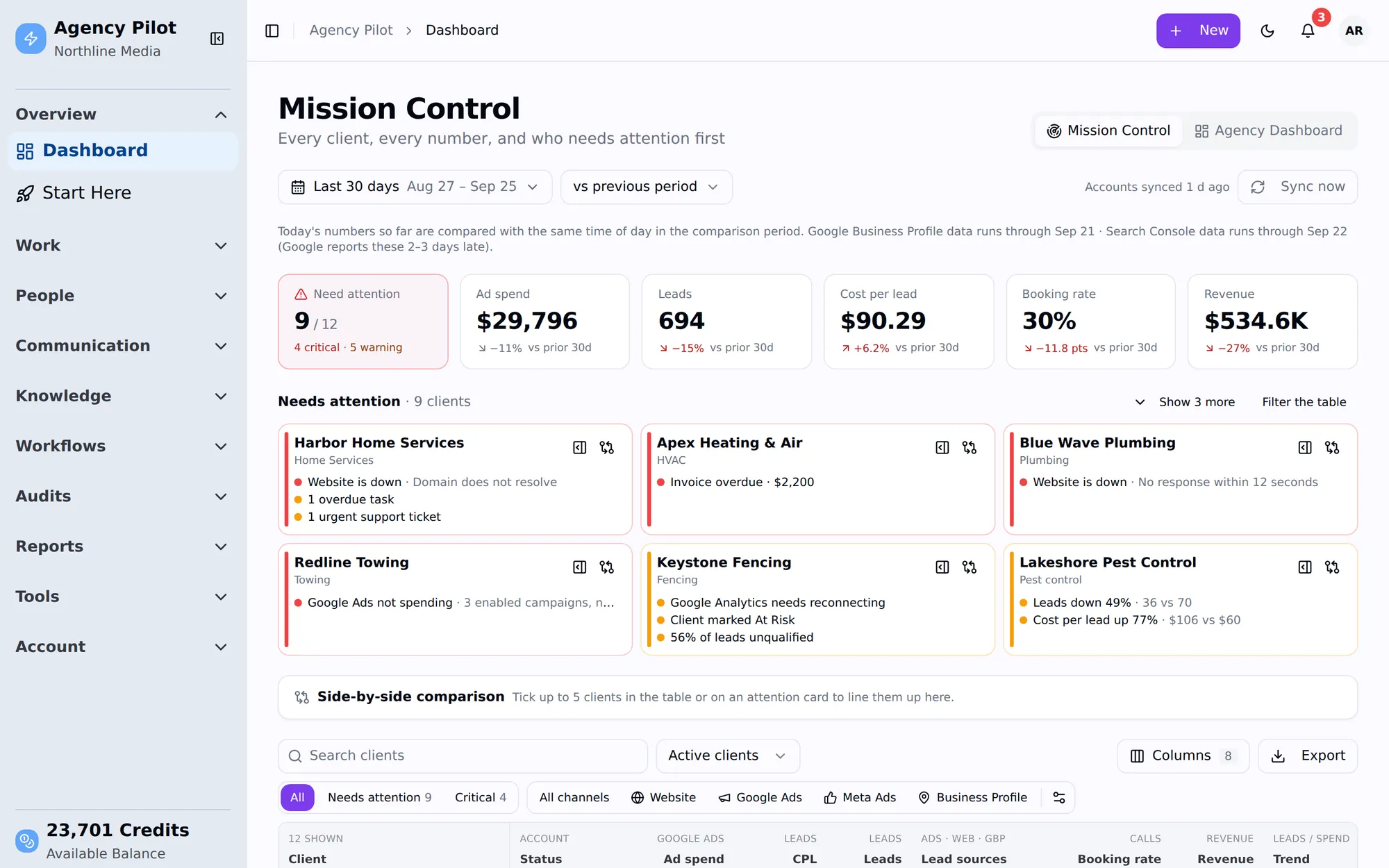
Get access to every client account with one link. Then track every client's ads, leads, rankings and revenue on one screen — and show them the results in reports and a portal they'll actually open.
14-day trial · 300 credits included · no contract
One login instead of ten subscriptions
- Client access requests
- Agency CRM
- Geo grid rank tracker
- SEO audit tool
- Client reporting
- Client portal
- Lead attribution
- Click-fraud tool
- Heatmaps & recordings
- Uptime monitor
From signed to reporting
From a signed contract to a live dashboard in a day
The slowest week in client work is the one spent chasing logins. Agency Pilot turns it into one link — and keeps going after the access is granted.
- 1
Send one link
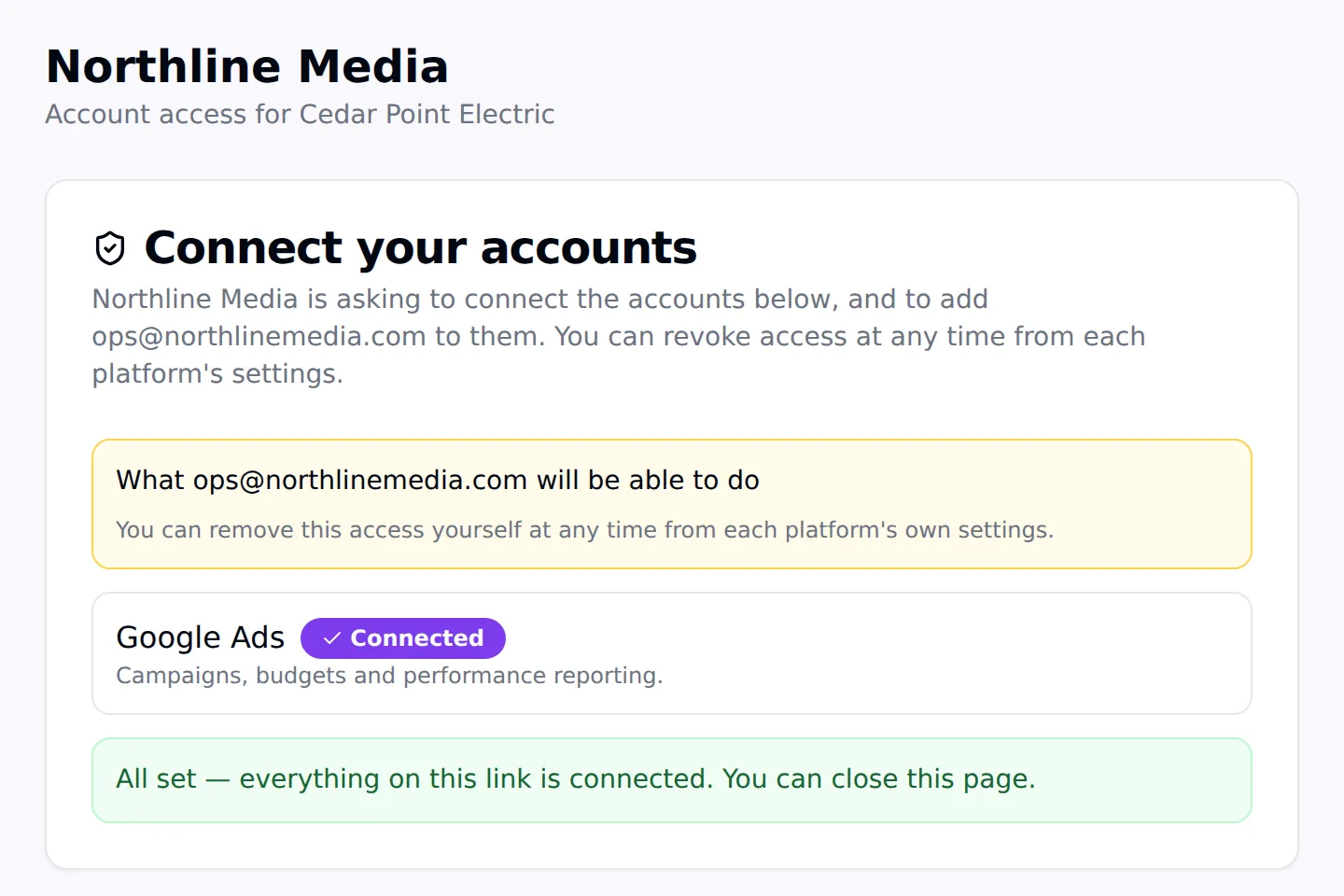
Your client connects Google Ads, Analytics, Search Console, Business Profile, Meta and more at the access level you chose. No passwords.
- 2
Access lands everywhere
Your agency is added or invited automatically where platforms allow it, and guided where they don't. You're told when it's done.
- 3
Numbers start flowing
Within the hour their dashboard fills with spend, leads, calls, traffic and rankings — and Mission Control flags anything wrong.
- 4
They see the results
Branded reports that tell you when they're opened, and a portal and LeadPulse app where the client can check any time.
- How onboarding links work
Features
Everything between the signed proposal and the monthly report
The day-to-day work of an agency, connected — so nothing lives in a spreadsheet, a separate tool or someone's inbox.
Client onboarding links
Access to every client account with one link, at the role you choose.
Mission Control
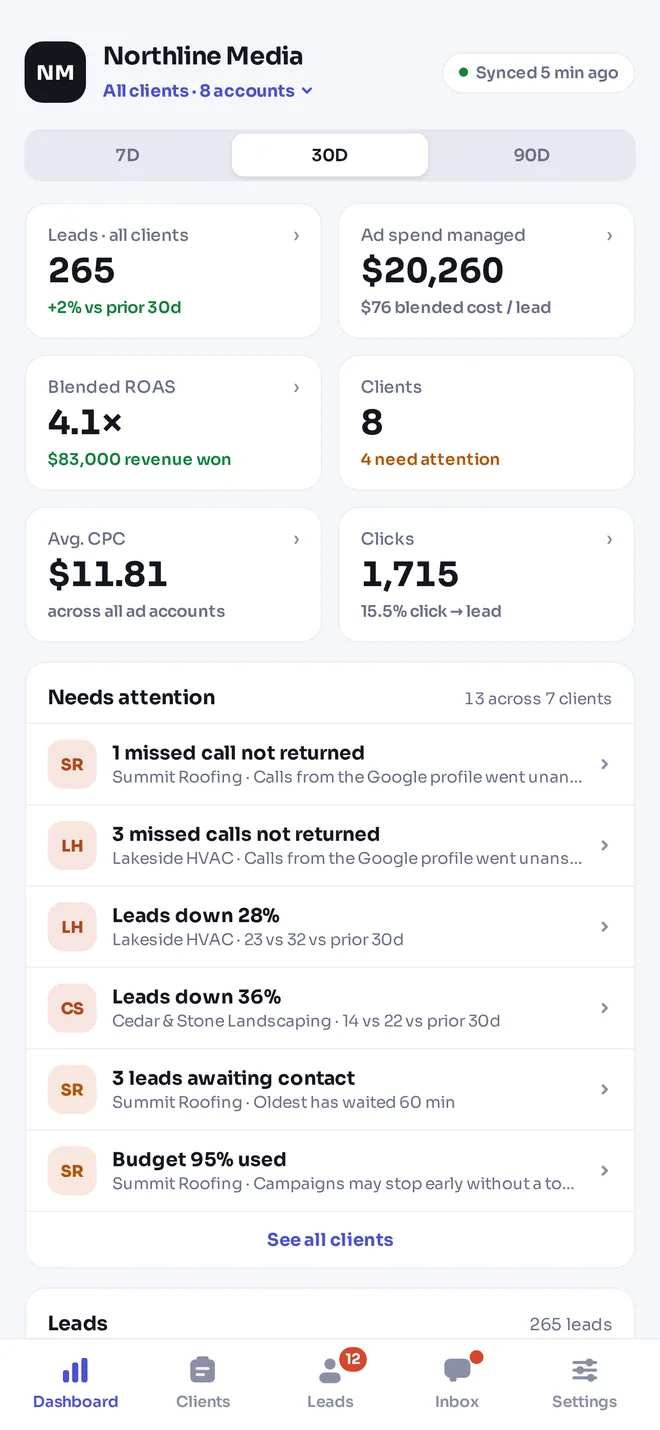
Every client's spend, leads, cost per lead and revenue, worst first.
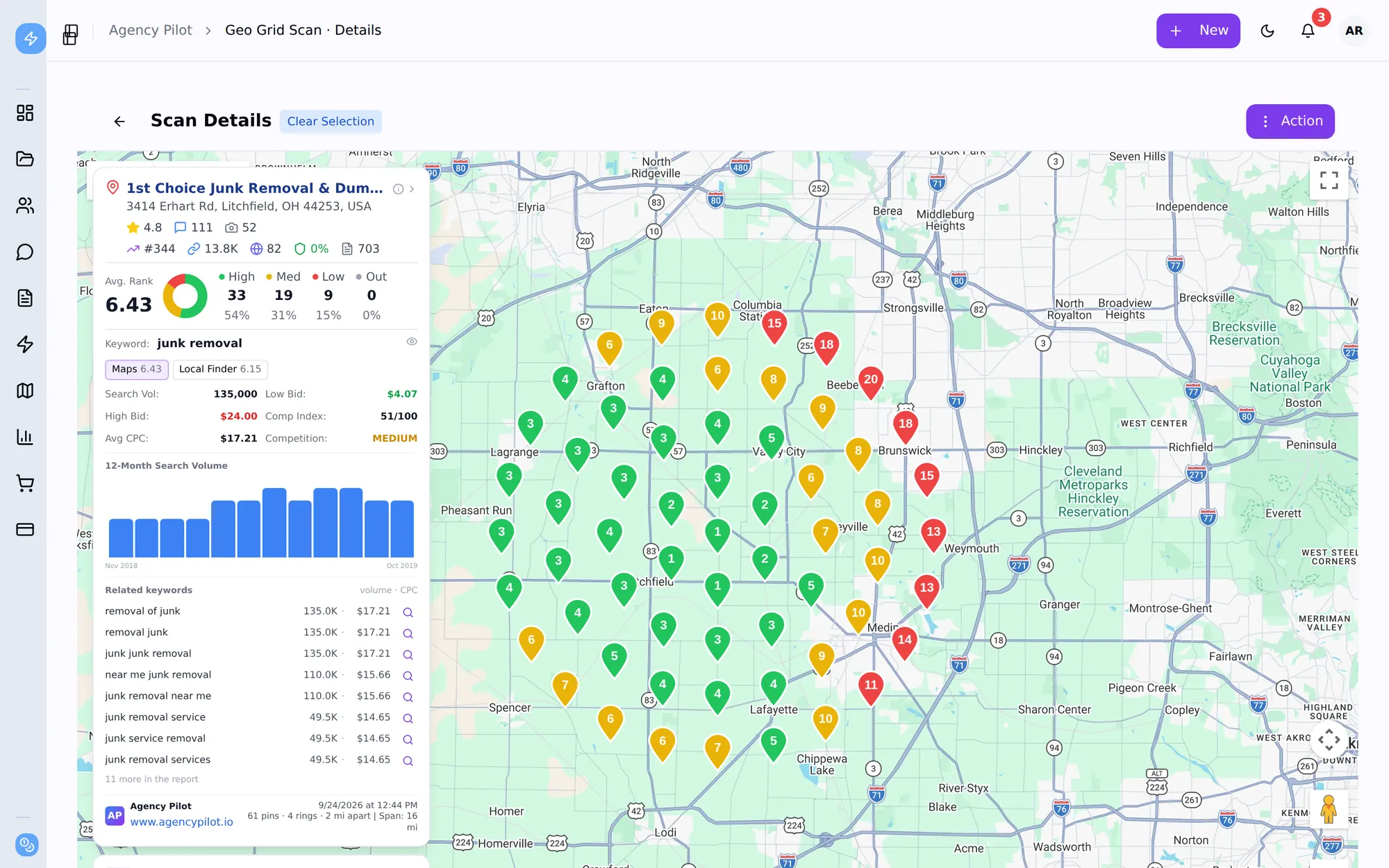
Geo grid rank tracking
Maps, Local Finder and organic rankings from up to 441 points.
15 SEO audits
Business Profile, website, keyword gap, AI visibility and more — graded.
Sales & client reports
Branded reports with estimated traffic value, and an alert when they're opened.
Lead & revenue attribution
Every lead tagged with its click; sold jobs turned into ROAS.
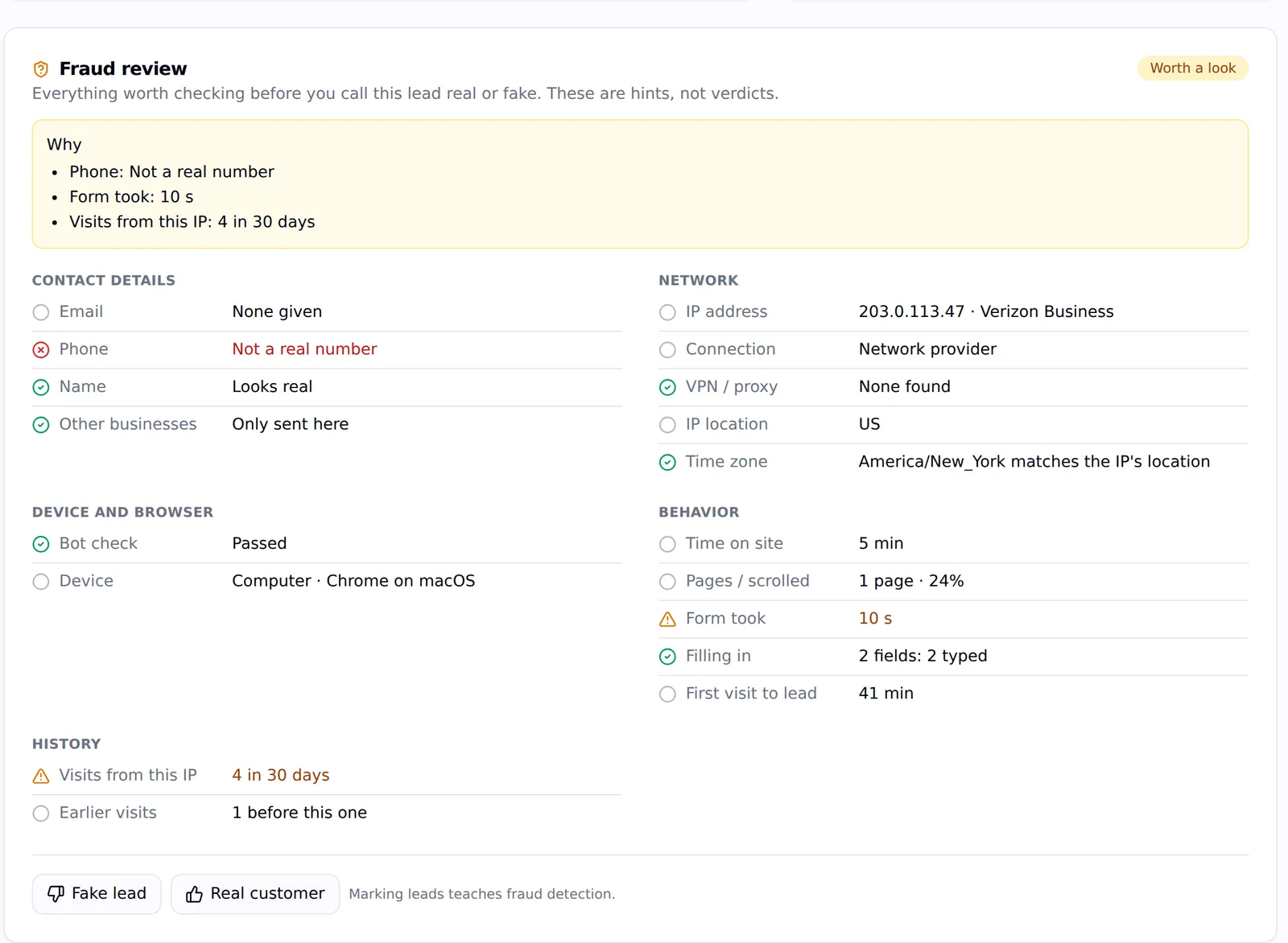
Click-fraud protection
Repeat clickers, VPNs and bots flagged; bad IPs blocked in Google Ads.
Heatmaps & recordings
See what visitors did, with privacy controls built in.
Website monitoring
Know a client's site is down before they do.
CRM & leads
Clients, contacts and leads the client can see and work.
Conversations
SMS, calls, email and support tickets per client.
Projects, SOPs & automations
Kanban, SOPs that create tasks, and rule-based automations.
Local SEO
Show clients exactly where they rank, street by street
Geo grid scans on Google Maps, the Local Finder and organic results, to the top 100. Fifteen graded audits. Branded reports with estimated traffic value in dollars — and an alert when the prospect opens one.
Attribution & protection
Know which leads made money — and which clicks were never customers
One script on the client's site tags every lead with the ad click, keyword and campaign behind it. Record the jobs they turned into and you have ROAS per client — sent back to Google Ads and Meta. The same script spots repeat clickers, VPNs and bots, flags fake leads and blocks bad IPs in Google Ads.
- Channel, click ID and keyword on every lead
- Sales, ROAS and lifetime value
- Repeat clickers and bots flagged
- Sites watched for downtime
Client portal & LeadPulse app
Fewer "any update?" emails
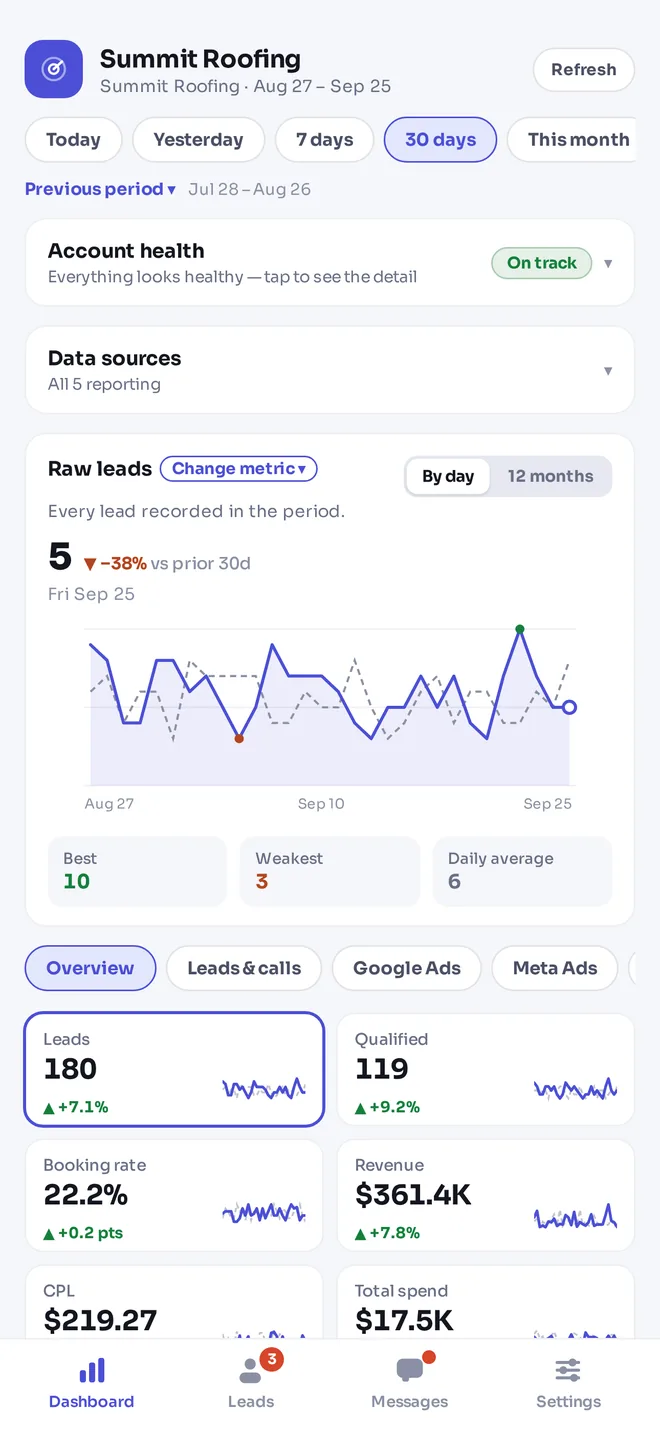
Every client gets a login of their own — on the web and on their phone. They see their leads the minute they arrive, their numbers against last month, their reports and invoices, and message your team in one place. You get the same app for every client, with Mission Control in your pocket.
Switching?
Replace the tools you're stitching together
Coming from Leadsie
Client access links, plus the reporting, rank tracking and portal that come after them.
Coming from Local Falcon
Geo grids on Maps, Local Finder and organic, inside a full agency platform.
Coming from Local Dominator
Bigger grids, fifteen audits and sales reports, plus onboarding and a CRM.
Security
Your clients trust you with their accounts. We treat that seriously.
No passwords shared
Clients sign in on each platform's own page. Owner access is never requested.
Agency isolation
Row-level security keeps every agency's data separate; client logins see only their own.
Encrypted tokens
AES-256-GCM at rest, never in URLs, never sent to the browser.
Roles and 2FA
Owner, admin, member and viewer roles, per-member permissions and authenticator 2FA.
Pricing
Simple plans that grow with your client list
Plans from $49. Every plan includes onboarding links, Mission Control and the client portal, and credits pay for scans, audits and reports — so you only pay for what you run.
Founding agencies: the first 25 agencies get 40% off for life, in exchange for a feedback call and a case study. Claim a spot
Freelancer
For freelancers and solo marketers with a small book of clients.
$39/ mo
$468 billed yearly
Start 14-day trial- 5 clients
- Up to 2 users
- 1,500 credits every month
Includes
- Website tracking script (no session recording)
- Invoices and client payment processing
- Client onboarding links
- Client portal
- Mission Control across every client
- Google and Meta reporting
- Local SEO scans, audits and reports
- Clients, tasks, projects, SOPs and automations
Agency
For growing agencies. Add clients in blocks of 15 as you win them.
$143/ mo
$1,716 billed yearly
Clients come in blocks of 15, with 4,500 credits each month per block.
- 15 clients
- Unlimited users
- 4,500 credits every month
Everything in Freelancer, plus
- Script and server-side tracking
- Session video recording (optional add-on)
- Heatmaps
- LeadPulse app for you and your clients
- Desktop screen recorder app (Mac)
- Lead attribution
- Conversion tracking and reporting
- Client lead notifications
- Internal team chat
- Client and customer chat
- Estimates and recurring invoices
- Automatic payment reminders
- Webhooks
- MCP connection for AI apps like Claude and ChatGPT
Powerhouse
For established agencies running a large book.
$397/ mo
$4,764 billed yearly
Start 14-day trial- Up to 150 clients
- Unlimited users
- 25,000 credits every month
Everything in Agency, plus
- Unused credits roll over
- Priority support
14-day trial with 300 credits, card required. Cancel any time before it ends and you won't be charged.
Every credit cost is on the pricing page. Need something different? Talk to us.
FAQ
Questions agencies ask first
Who is Agency Pilot built for?
Marketing agencies and freelancers who manage work for several clients — especially local SEO, Google Business Profile, paid ads and web projects for local service businesses.
How does client onboarding work?
You send one link. The client connects Google Ads, GA4, Search Console, Business Profile, Tag Manager, Merchant Center, YouTube, Meta, TikTok, LinkedIn, Snapchat, Shopify and website access at the level you chose. Your agency is added automatically where the platform allows it and the client is guided through the rest — no passwords.
What are credits?
Credits pay for the tools that cost money every time they run: geo grid scans, rank tracking, SEO audits and reports, keyword and ad research, backlink and citation lookups, review checks and AI writing. The CRM, onboarding, Mission Control, portal and tracking script don't use credits. Every cost is listed on the pricing page.
Can my clients log in?
Yes. Each client gets their own portal and LeadPulse app login with their dashboard, leads, reports, invoices, documents and support tickets — and nothing that belongs to another client.
Does it replace Leadsie, Local Falcon or Local Dominator?
For many agencies, yes: client access links, geo grid rank tracking and audits are all built in, alongside the CRM and reporting. Our comparison pages say where each of those tools is still the better fit.
Do I need to install anything?
No. Agency Pilot runs in the browser, with the LeadPulse app for you and your clients. Client websites get one tracking script tag.
Still have a question? Email us.
Put your agency on autopilot
Start a 14-day trial with 300 credits. Add your first client and send an onboarding link today.
Choose marketing agency software around the client journey
An agency platform is most useful when it connects the jobs you repeat for the same client. Agency Pilot starts with the client record and brings together access requests, local SEO research, operational work, lead visibility, and reporting. You can evaluate it by following that journey rather than reading a long list of unrelated capabilities. Begin with one service you already deliver, such as local SEO for a business with an active Google Business Profile.
The first question is practical: where does your team lose context today? It might be the handoff from a signed proposal to account access, the link between incoming enquiries and recorded sales, or the work involved in explaining search performance. Choose the bottleneck that costs your team the most attention. Then check whether the connected workflow helps the person responsible complete the job with fewer repeated explanations.
Connect the agency view with the client view
Your team needs a view across accounts, while each client needs a clear view of their own business. Mission Control helps the agency review connected performance and accounts needing attention. The client portal gives the business a place to find its own leads, shared reports, invoices, and messages. These views serve different decisions, even when they refer to the same underlying work.
Treat that connection as a working agreement. Decide which results you will discuss, which reports you will share, and which lead outcomes the client should update. If the client records a sale, the agency gains context that a website visit alone cannot provide. If a dashboard number looks unexpected, review the source and period before drawing a conclusion. Good agency software makes the evidence easier to reach; the agency still turns that evidence into an explanation and a next action.
Run a small, representative agency software pilot
Choose a client who resembles the work you repeat most often. A useful pilot has a real account owner, an active service, a reporting question, and someone willing to check the client experience. Avoid beginning with the largest account or an unusual exception. Write down the existing handoffs before changing them: who asks for access, who checks it, who reviews results, and who answers the client. This gives the team a fair comparison between the current process and the proposed one. It also helps separate a software problem from a missing owner or an unclear service agreement.
Follow one piece of work all the way through. Request the necessary connection, verify the selected business, perform the relevant research, and explain the result to the client. Ask a teammate to repeat the process using your instructions. Record where they stop to ask a question. If a step still requires another product, keep that product in the evaluation instead of assuming it disappears. A successful trial should reveal both the useful connections and the remaining boundaries. Review those observations before moving more clients, and make the next rollout a deliberate decision with named responsibilities.
Frequently asked questions
Which agency workflow should I test first?
Start with a service you deliver repeatedly and a client whose account owner can participate. Follow the process from access through research and client review. This reveals practical handoffs more clearly than opening every feature once. Record the steps that remain outside the platform so the evaluation reflects your real operating model.
How does Agency Pilot support local SEO delivery?
The local SEO toolkit includes geo grid tracking, keyword work, audits, backlink and citation research, and client reports. These tools sit alongside the client workspace. Choose a relevant question before running research, keep repeat measurements consistent, and use the result to explain a proposed action rather than promising a particular ranking.
Can I evaluate it while keeping my existing tools?
Yes, a measured evaluation can run alongside your current process. Keep your existing records available and choose a small pilot. Compare the work required for the same client task in both systems. Do not cancel another subscription until you have checked the specific capability and historical information your team depends on.
What should the account manager review each week?
A useful review covers accounts needing attention, missing connections, incoming enquiries, client questions, and promised deliverables. The exact cadence depends on your service. Use Mission Control as a starting point, then open the relevant client context. Assign follow-up work to a person instead of leaving an unexplained change in a chart.
Does the platform replace professional marketing judgment?
No. Research, reporting, and workflow tools help collect and organise evidence. They do not decide the right offer, explain every change in demand, or guarantee a campaign outcome. Your agency still sets the strategy, checks the data, prioritises work, and communicates what the evidence does and does not show.
How should I introduce the portal to a client?
Show the client their own account and one task they will use regularly, such as reviewing a new enquiry. Explain where reports and messages live and who handles questions. Ask the client to complete an example action. A short practical introduction is easier to follow than a feature tour without a purpose.
What is the difference between research and connected reporting?
Research actions such as scans and audits answer a specific question at a point in time and can consume credits. Connected reporting brings supported account metrics into the workspace. The pricing page explains the distinction and plan coverage. Use both thoughtfully: recurring reporting provides context, while targeted research helps investigate a question.
How can a small agency decide whether consolidation helps?
List the tools used for one client and the information copied between them. Test whether Agency Pilot reduces those repeated handoffs without losing an essential capability. Compare the complete process, including any tools you retain. The useful outcome is a clearer workflow and an understood cost, rather than consolidation for its own sake.
Can a client keep ownership of their marketing accounts?
The onboarding approach uses provider permissions rather than asking clients to hand over passwords. The agency requests an appropriate role for the selected asset. Keep ownership and account recovery arrangements with the client, and explain which permissions can be removed later. Review each integration page because providers use different access models.
What should I check before inviting my team?
Agree on the pilot client, the responsibilities each person needs, and the first task they should complete. Review the plan for user limits and relevant features. Prepare a short working procedure so teammates can repeat the same handoff. This prevents an evaluation from becoming a collection of disconnected experiments.
Why does recording lead outcomes matter?
An enquiry count describes activity, while an outcome explains what happened next. Updating lead status and recording a sale can help the agency discuss commercial results with the client. Establish who supplies those updates and what each status means. Incomplete follow-up information should be acknowledged when interpreting revenue or return metrics.
How should I assess the quality of a report?
Check whether the report answers the client’s agreed question, identifies the period and source, and explains a sensible next action. A visually complete report can still lack interpretation. Review it as the client would: can they understand what changed, what work was completed, and what decision requires their input?
Where can I check platform limitations?
Use the detailed feature, integration, pricing, and comparison pages. They describe supported workflows, plan differences, and boundaries such as automatic versus guided access. If a specific requirement is not answered, contact the team with the exact task you need to perform. Do not infer support from a broad feature label.
How do I plan the first month of usage?
Estimate the number of clients, scheduled scans, audits, and reports you intend to run. Separate initial discovery from recurring monitoring. Check the published credit examples and the cost displayed before each action. Review actual usage after the pilot so you can select a cadence that fits the service you sold.
What does a successful trial look like?
A useful trial ends with evidence: a verified connection, a completed piece of client work, a checked client-facing experience, and an understood budget. Include the people who will use the workflow after purchase. Record unresolved requirements and decide whether they are acceptable before expanding beyond the pilot account.