Skip to content
Agency Pilot

Run the agency

Agency management software that connects the work

Bring the client handoff, delivery tasks, conversations, invoices and marketing results into one operating workspace. Agency Pilot helps your team see what needs attention and gives clients a place to follow their own business.

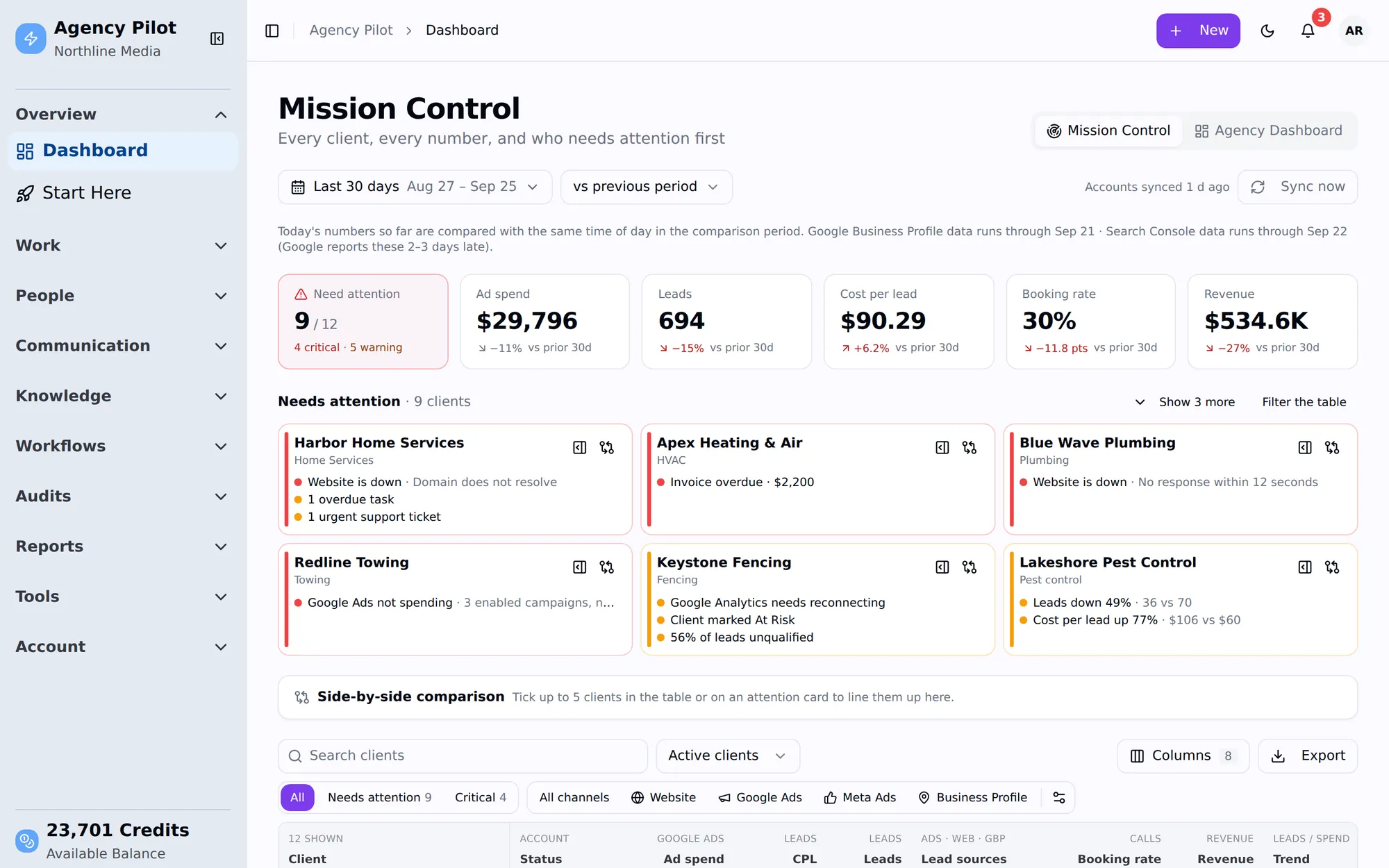
Agency Pilot Mission Control with client performance totals and account attention cards
An agency view for deciding which client needs attention next.

Start with the right access

Collect marketing account access through onboarding links, with automatic grants where supported and guided steps for the remaining platforms.

Make delivery repeatable

Apply an internal SOP to create assigned, due-dated client tasks. Use rules for routine notifications, task creation and connected actions.

Keep the conversation in context

Work with texts and calls through connected providers, individual email accounts and portal support. Internal discussion stays separate from client replies.

See the accounts that need you

Mission Control brings client metrics and attention flags together. Open an account to investigate its results, source status and operational context.

Give clients their own view

The client portal brings together their leads, results, shared reports and invoices. Clients can update lead outcomes and record sales.

Carry the agreement into billing

Interactive proposals can connect acceptance with client and invoice records. Review plan availability and configure the delivery handoff around your agreement.

Manage the engagement beyond the sale

An agency relationship continues after the proposal is accepted. Someone needs to collect access, confirm the scope, assign work, answer questions and explain the result. When those handoffs live in separate places, the team spends time reconstructing what was agreed instead of moving the engagement forward.

Agency Pilot brings those operating activities around the client. Your team can use the account context when reviewing a task or a performance issue, and the client has a separate view of the information shared with their business. The value is a clearer working process, with responsibility attached to the next step.

Connect delivery decisions to the client outcome

A completed task list is useful, but it does not explain whether the marketing is producing suitable enquiries. Connected dashboards, lead outcomes and recorded sales give the account manager another view of the engagement. Review that evidence alongside the work delivered before deciding what the next month should contain.

The data still needs interpretation. Source publication delays affect recent comparisons, revenue depends on recorded sales, and a warning is a reason to investigate rather than a final diagnosis. Keeping these limits visible makes the operating review more useful for both your team and the client.

Adopt it around a real service workflow

Choose one representative engagement and define its handoffs from kickoff to reporting. Connect the relevant accounts, apply the procedure your team actually follows, and practice the client-side updates that reporting depends on. Expand the workflow after you have checked the first complete cycle.

You do not have to replace every specialist tool to create a clearer agency operation. Review the integrations, provider requirements and plan limits against your service mix. Keep specialist work where it belongs while giving account owners a dependable place to understand the client relationship.

What this does not do

Better to find this out here than three weeks in.

  • Agency management does not remove the need for a named owner, clear scope and maintained client records.
  • Email and telephony rely on your connected providers; provider usage and configuration remain part of the workflow.
  • Feature availability, client limits, credit usage and add-ons vary by plan. Check pricing against the services you intend to deliver.

Build a clearer client handoff

Explore the plans and start with the workflow your team repeats most.

Map the full engagement before choosing software

Agency management software should support the service you actually deliver. Start by mapping one engagement from the accepted scope through access collection, implementation, review, billing and renewal discussions. Identify the information needed at each transition and the person who needs it. This exercise often reveals that a delayed project is waiting for a decision or credential rather than more task-management features. Use the map as a selection checklist. Ask where the software holds the client context, which handoffs it can support and where your team still needs an operating agreement. The result is a more realistic evaluation than assuming that putting every tool under one login automatically creates a working process.

Define the account owner's responsibility

Every active client should have someone responsible for the whole relationship, even when specialists own individual tasks. Define how that account owner reviews outstanding work, client questions, reporting completeness and upcoming commitments. This role is about continuity rather than doing every task personally. When a specialist finishes an investigation, the account owner should know what the finding means for the client and whether an update is due. Agency Pilot provides client context, communication and portfolio views that can support this routine. Your agency still needs to establish who checks them and what action is expected when a dependency or concern appears.

Make access a delivery dependency with evidence

A kickoff can be enthusiastic while the team lacks the permissions required to start. List the actual accounts involved in the service and request the appropriate roles through the onboarding workflow. Distinguish connected reporting from direct platform access, and verify guided invitations rather than treating a completion tick as proof. Record what remains blocked and which work can proceed. An illustrative website engagement might begin with content planning while a hosting invitation is outstanding, but publication cannot be promised without the necessary access. Connecting the request to the delivery plan keeps account managers from committing dates based on an incomplete view of readiness.

Use procedures to create consistent outputs

A repeatable service needs more than a list of task names. Each procedure should explain the expected output, the information required and how the next person knows the step is complete. An onboarding review might produce a confirmed account list and an exception note; a reporting procedure might produce a client-ready explanation and next-month actions. Applying an SOP can create real tasks, but the quality of those tasks still depends on the process you write. Review the first run with the team and revise instructions that cause ambiguity. Standardize the parts of the service that repeat while preserving the client-specific decisions that require judgment.

Keep client visibility deliberate

Clients need enough information to understand progress and participate in their part of the work. They do not need every internal discussion or an agency-wide view of unrelated accounts. Decide what belongs in the client portal, what should be explained in a scheduled update and what remains an internal working note. A shared report should be accompanied by context about its purpose and limitations. A client lead workflow needs a clear explanation of what the business should update. Thoughtful sharing makes the portal part of the service experience rather than another place the client must search for an answer that has never been written clearly.

Review operational health and marketing results together

A client can have completed tasks but weak business outcomes, or improving demand alongside an unresolved operational problem. Review both dimensions before deciding the next priority. Mission Control can identify accounts needing attention, while the client view provides detail about performance and source status. Combine those signals with the scope, work delivered and client feedback. An illustrative increase in enquiries may call for better response coverage before more advertising spend. Conversely, a quiet campaign may need a technical investigation before a new strategy. The account review should lead to a specific next action rather than treating either task completion or a single metric as the whole story.

Keep billing expectations connected to the agreement

Make sure the client understands what is due, what recurs and what event starts the engagement. Where interactive proposals are part of the plan, review the acceptance and payment configuration against the service being sold. Later invoice schedules and delivery procedures still need an owner. If the scope changes, document the new agreement and inspect the affected work and billing records rather than assuming one conversation updates everything. A clear commercial handoff reduces the chance that the delivery team starts work under one understanding while the client expects another. The software supports the records; the agency supplies the coherent agreement between them.

Evaluate fit with a complete operating cycle

Use a representative client workflow to assess the product, including the awkward parts: incomplete access, a changed request, a missing sales update and a handoff between colleagues. Check the relevant integrations, provider requirements, client limits and credit usage before broad rollout. Some specialist systems may remain part of the service, and that can be appropriate. Define which place is authoritative for each record so staff do not maintain conflicting versions. After the first cycle, ask whether people can find the next action and explain the client position more easily. That is stronger evidence of operational fit than a successful login or an attractive demonstration dashboard.

Frequently asked questions

What is agency management software used for?

It helps an agency organize the ongoing client engagement: onboarding, delivery work, communication, reporting and related commercial records. The important unit is the relationship and its next action. Agency Pilot brings these activities together, while your team defines ownership, scope and the working practices that make the information useful in daily delivery.

How is agency management different from an agency CRM?

A CRM conversation usually begins with prospect follow-up and relationship information. Agency management extends into the work needed to serve the client after the sale. The two overlap, but evaluate them against different questions: whether sales can manage an opportunity, and whether delivery can fulfill the engagement without losing context during the handoff.

Does using one workspace eliminate every other agency tool?

No. Connected providers and specialist platforms can remain part of the service. Evaluate which tasks Agency Pilot supports directly, which rely on integrations and which belong elsewhere. The operational benefit comes from a clear client context and handoff, not from promising that every specialist application can be removed from every agency's stack.

What should we set up before adding the whole client portfolio?

Define a representative service workflow, identify its owners and confirm the required platform access. Test the client communication and reporting steps as well as internal task creation. Review the relevant plan limits and provider setup. A complete example gives the team a practical standard before the process is repeated across many accounts.

Can agency SOPs create actual work for the team?

The documented SOP workflow creates assignable, due-dated tasks when a procedure is applied to a client. Review the generated work to ensure the timing and responsibility fit the engagement. The procedure should describe the expected outcome clearly enough that completion means something more than a colleague ticking a vague task title.

How should we handle an onboarding step that is blocked?

Record the missing dependency, who can resolve it and which delivery commitments it affects. Decide what can proceed with the access already available. For guided platform steps, verify the actual invitation or permission. A visible exception is more useful than marking the entire onboarding complete while the delivery team is still unable to perform agreed work.

What can clients see through the portal?

The documented portal includes their own results, leads, shared reports, invoices and support-related information. It is distinct from the agency workspace and portfolio view. Introduce the relevant parts during onboarding and explain what the client should maintain, such as lead outcomes or sales, rather than assuming access alone establishes a useful collaboration habit.

How can account managers prioritize work across clients?

Start with the portfolio attention signals, then inspect the client details and current business context. Assign an owner and a concrete next action for issues that need work. A warning can reflect a planned pause, incomplete data or a genuine problem, so it should prompt investigation rather than become an automatic conclusion about performance.

Does the dashboard remove the need for client reviews?

No. The dashboard makes information available, but the review connects that information to business decisions. Explain what changed, what the team believes it means and what action follows. Clients can inspect their own numbers between meetings while the agency provides the interpretation, specialist work and follow-through needed to turn the information into a service.

Can this guarantee that projects finish on time?

No software can guarantee a delivery outcome when scope, access, staffing or approvals remain unresolved. Assigned tasks and clear procedures make dependencies easier to manage. Use those records to identify risk early and agree realistic commitments with the client rather than treating a due date in the system as proof that every prerequisite is ready.

How should we decide which automation to build first?

Choose a repeated administrative handoff with a clear trigger and predictable action, such as creating a task or notifying the responsible person. Test the conditions and recipients before enabling it. Preserve human review for decisions that depend on client context. A narrow, dependable rule is usually a better first step than automating an unclear service process.

What should we review before choosing a plan?

Compare the intended client count, feature availability, scan or audit usage and any add-ons with the published pricing. Also account for connected communication and payment providers. Work through a realistic month of service rather than choosing solely from the headline subscription, especially when your agency uses credit-based research or different workflows for different types of client.

How do we keep internal notes separate from client updates?

Use the internal areas for team discussion and the appropriate client-facing channel for a reviewed explanation. Establish a simple handoff convention so colleagues know what has been promised externally. Before sharing a report, task or response, check that its wording makes sense to the client and contains the context intended for that audience.

What is a good sign that the rollout is working?

Another colleague can find the client position, understand the outstanding dependency and identify the next responsible person without reconstructing the relationship from private messages. The client knows where to see relevant information and what they need to update. Review these practical behaviors alongside the completeness of the records rather than judging adoption only by login activity.

When might an agency need a more specialized system alongside it?

When a requirement falls outside the documented workflow, evaluate it directly rather than assuming a broad product category includes it. Examples could include a specialized financial process or a highly customized sales model. Keep the system boundary clear, identify the authoritative record and test the handoff so adding a specialist tool does not reintroduce conflicting client information.