
Skip to content
Agency Pilot

Proposals

A proposal the prospect can click through, sign and pay

Build the proposal from the saved geo grid scan and audit you already ran for the prospect. They open a private page, see where they show up today, move the revenue calculator, pick a plan and accept. You're told when they open it and which plan they looked at, and acceptance creates the client, the invoice and the monthly billing.

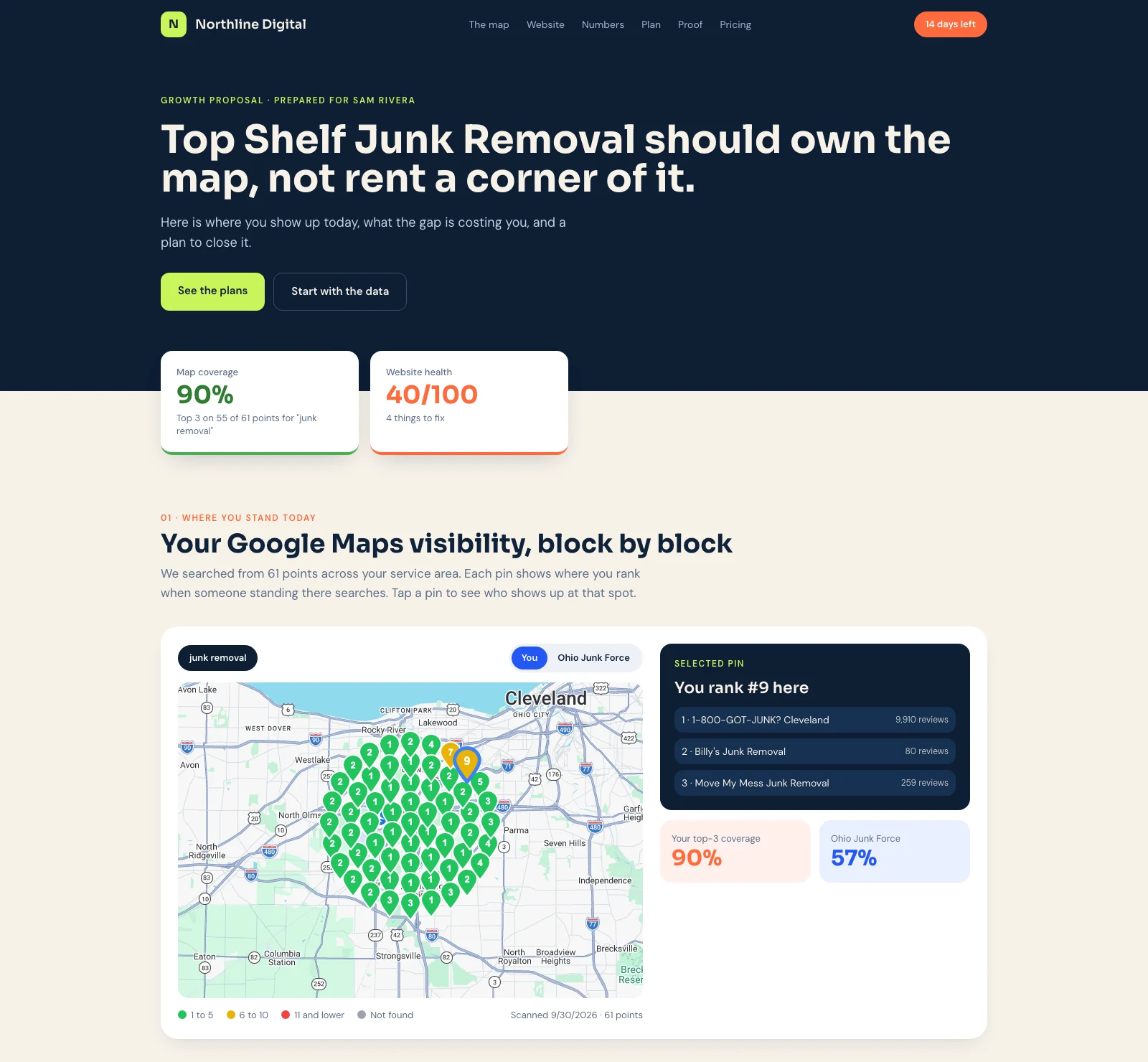
A proposal page showing the prospect's Google Maps visibility, with a ranking for each pin and the website score
What the prospect sees: their own map scan, with the plans, calculator and signature further down the page.

Their own data, on the page

A saved map scan with real pins, the audit findings, a competitor comparison and the keywords you chose. Nothing is pulled live when they open it.

A calculator they can move

Leads, booking rate and ticket size feed a revenue estimate with three scenarios. The numbers they settle on are saved as the client's baseline.

Signed and sealed

They type their name and tick the consent box. The agreement is signed as a contract, and both sides get the sealed PDF.

Private by default

An unguessable link, an optional passcode and an expiry date. Void it and the link stops working.

Know what they did

A notification when they first open it, come back, click a plan, ask for changes, decline or accept, and a timeline of the rest.

Acceptance does the setup

The client record, the first invoice, the recurring monthly invoice and your automation all start without anyone re-typing the deal.

From scan to proposal in one sitting

The builder has seven steps: the prospect, the services, the scan and audit to show, the keywords, the calculator, the pricing, and sending. The scan, audit and keyword lists are your agency's saved work for that business, so a proposal for a prospect you already pitched takes minutes.

Pricing is up to three plans plus optional add-ons, or a single flat price. Mark one plan as recommended, set a one-time setup fee and a term, and choose what is collected when they accept: setup and the first month, setup only, or nothing.

Save a finished proposal as a template to start the next one from, and use Preview as client to see exactly what the prospect will see. Nothing you do in preview is recorded or sent.

What the prospect sees

A single scrolling page in your agency's name and colours, readable on a phone. It opens with a headline and the numbers that matter most, then walks through the map, the website audit, how they compare with the businesses ranking above them, the keywords and ad budget, and what you would do over the first months.

The revenue calculator lets them change their own lead volume, booking rate and average job value and see the estimate move. The estimates are labelled as estimates, with a disclaimer you can edit.

Plans sit side by side with add-ons they can switch on, and the monthly total updates as they choose. If you set a passcode, they enter it first. If you set an expiry, the page says so and stops working after it.

Accepting means signing, and paying if you ask for it

Acceptance asks for a full name and a consent tick. Their choice of plan and add-ons is checked against the prices you saved, never against anything the browser sends, and the agreement they sign states the plan, the price, what is due now and the term.

When you collect money on acceptance, they go to a secure checkout on your own Stripe account and come back to the page, which confirms the payment. If they leave before paying, the page remembers their choice and lets them finish.

Once the signature and any payment are in, the proposal is locked and a signed PDF is available to both sides.

  • The client is found by email or created, and linked to the proposal
  • An invoice for the setup fee and first month, marked paid by the payment
  • A monthly invoice schedule that starts the month after the first month collected
  • The calculator numbers saved as the client's baseline for later reports
  • You and the prospect emailed, and your automation run

Automations that follow the proposal

Ten triggers are available in the automation builder: proposal sent, opened, plan clicked (optionally for one plan), accepted (at the signature), paid, onboarding completed, declined, changes requested, not opened, and step stalled (signed, but the next step has sat for a few days). Use them to create a follow-up task when someone opens it and goes quiet, text the owner when they click your top plan, or kick off onboarding the moment they accept.

The not-opened trigger runs once, after the number of days you set on the proposal. Pick an automation on the Send step and it runs then, and you get a notification either way.

The numbers

At a glance

PlansUp to three, plus add-ons, or one flat price
SignatureTyped name with a consent tick, sealed into a PDF
PaymentHosted checkout on your own Stripe account
AccessPrivate link, optional passcode, optional expiry
TriggersSeven, from sent to not opened

What this does not do

Better to find this out here than three weeks in.

  • Signatures are typed names. There is no drawn or uploaded signature.
  • Payment on acceptance is one charge for the setup fee and first month. Later months are invoiced on the schedule created at acceptance.
  • The map, audit and keyword sections show what you saved. They don't refresh after you send, so run a new scan and send a new proposal if the picture changes.
  • A signed proposal is locked. To change the deal, void it and send a new one.
  • Acceptance doesn't create the kickoff project or send an onboarding link by itself. Use the accepted trigger to start those.
  • Interactive proposals aren't included on every plan. See pricing for what each plan has.

Questions

Does the prospect need an account?
No. They open the link, and sign and pay without signing up for anything.
Can I send the same proposal to someone else?
Each proposal has its own link. Duplicate it to send a second one, and void the first if you want its link to stop working.
What if they want something changed?
They can send a message from the page. It reaches you as a notification, shows on the proposal, and runs your changes-requested automations.
What if the payment fails?
They stay on the page with their choice kept, and can try again. A failed payment shows on the proposal's timeline.
Can I see who opened it?
You see when it was opened, how often, which sections they spent time on and which plan they clicked. Visits from known bots and link previews aren't counted.

Send your next proposal as a page

Start from a scan you already ran and see how far the prospect gets.