
Skip to content
Agency Pilot

Local SEO

Google Maps rank tracker

Track your clients' Google Maps rankings the way their customers see them: from every part of the service area, on the map and in the Local Finder, week after week — and get told when a competitor moves in.

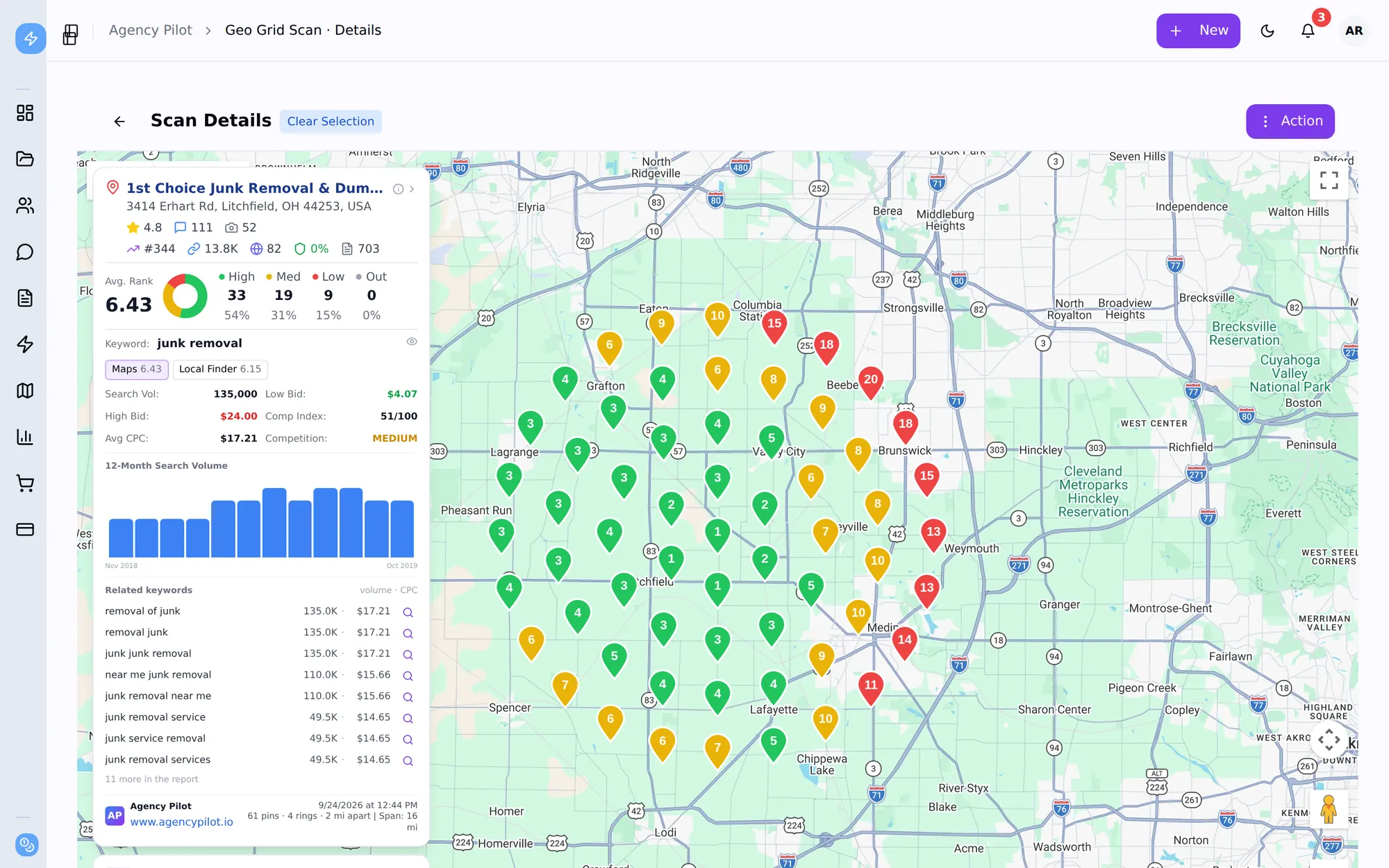
A Google Maps ranking scan in Agency Pilot with rank pins across the map and the business panel
Maps rankings from 61 points across the service area, in one scan.

Maps and Local Finder

Separate scans for the Google Maps results and the Local Finder list behind the 3-pack — they don't always agree.

Rank at every point

Up to 441 points per scan on a square or circular grid, so rankings reflect the whole service area.

Tracked over time

Scan history, side-by-side comparison and a ranking-history report show movement month by month.

Competitor alerts

Alerts when a competitor takes top-3 spots or jumps, and when your client's rank or coverage drops.

Keyword data alongside

Search volume, cost per click, seasonality and related keywords for every tracked term.

Reports clients read

Branded visibility and history reports with missed clicks in dollars, plus public share links.

Map rankings change street by street

Google Maps ranks a business differently depending on where the searcher is standing. A single "you rank #2" from the business's own address hides the fact that two miles north it doesn't appear at all. The only honest way to track Maps rankings is from many points at once.

Agency Pilot's Maps tracker runs the search from every point in a grid, records the full list of businesses at each one, and turns it into a heat map, an average rank, top-3 coverage and a ranked competitor list.
Maps, the Local Finder, and why both matter

The Google Maps app and the Local Finder (the list you see after tapping "more places" under the 3-pack) use related but different rankings. A business can hold the pack on Maps and sit sixth in the Local Finder, or the other way round. Agency Pilot scans them separately and links scans run together, so you can compare them point by point.

Add an organic scan on the same grid and you have the full local picture: map, local list and blue links.

Tracking, not just checking

Every scan is stored, so re-running the same keyword on the same grid gives you a like-for-like comparison. The Ranking History report plots top-3 coverage and average rank across scans; schedule it monthly and the tracking runs itself.

Competitor alerts watch for the moves that matter: a competitor taking top-3 spots across the grid, a sudden jump, or your client's own rank or coverage dropping.

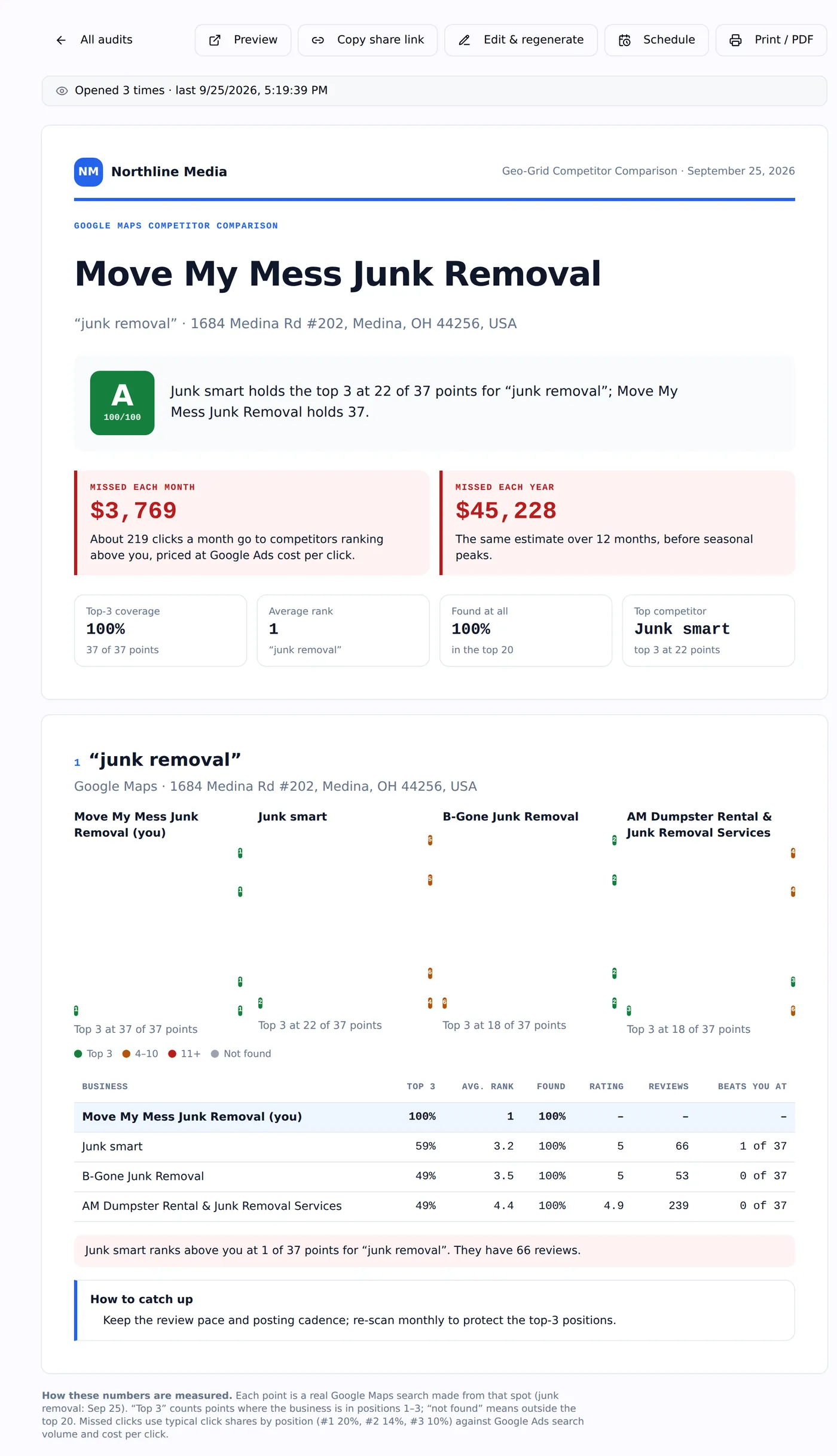
A geo-grid competitor comparison report with grade, missed revenue and competitors
Maps rankings compared with three competitors, in a branded report.

What this does not do

Better to find this out here than three weeks in.

  • Apple Maps and Bing Places aren't tracked.
  • Each scan type uses its own credits, so tracking Maps and the Local Finder on the same grid costs two scans.
  • Tracking runs on the schedule of the report you set up, or when you re-run a scan; it doesn't scan continuously.

Questions

How do you track Google Maps rankings accurately?
Search from many locations across the service area rather than one. Each grid point is a separate search from real coordinates, so the average reflects what customers across the area actually see.
How often do Google Maps rankings change?
Constantly, in small ways. For reporting, monthly scans on the same grid are the useful cadence; weekly during active work on the profile.
Can I track competitors on Maps?
Every point records every business in the results, so each scan doubles as a competitor tracker. Analyze compares the business with the five competitors that appear most often.
Does it work for multi-location businesses?
Yes. Scan each location from its own center point; each belongs to the client record.

Put your agency on autopilot

Start a 14-day trial with 300 credits. Add your first client and send an onboarding link today.