
LeadPulse for iPhone
Your agency, and every client's results, on your phone
LeadPulse is the Agency Pilot app for iPhone, and it serves both sides. You get Mission Control across every client, leads, onboarding links and client conversations. Your clients get their own dashboard, new-lead alerts and a direct line to your team.
For your agency
Every client in your pocket
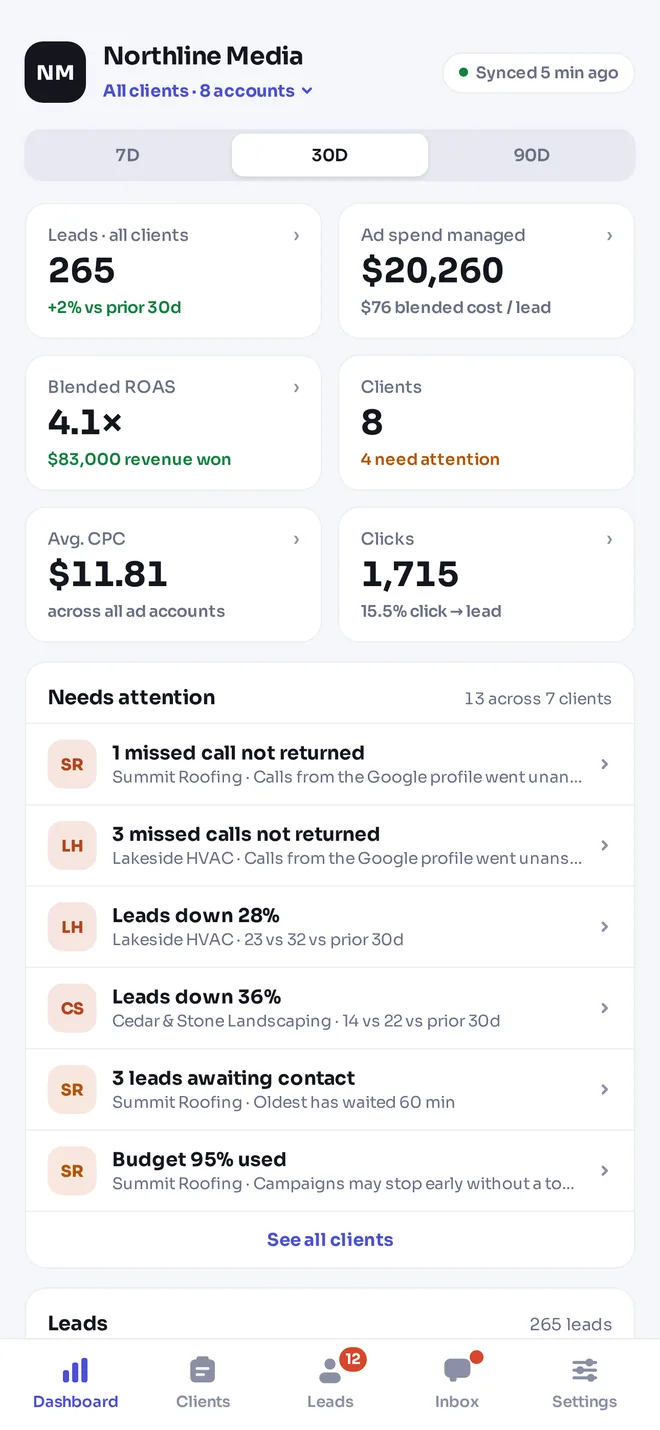
The agency side opens to Mission Control: leads, spend, ROAS and the clients that need attention, across every account you manage.
Mission Control
Leads, spend, blended cost per lead, ROAS and clicks across all clients, with the attention list.
Clients, projects, calendar
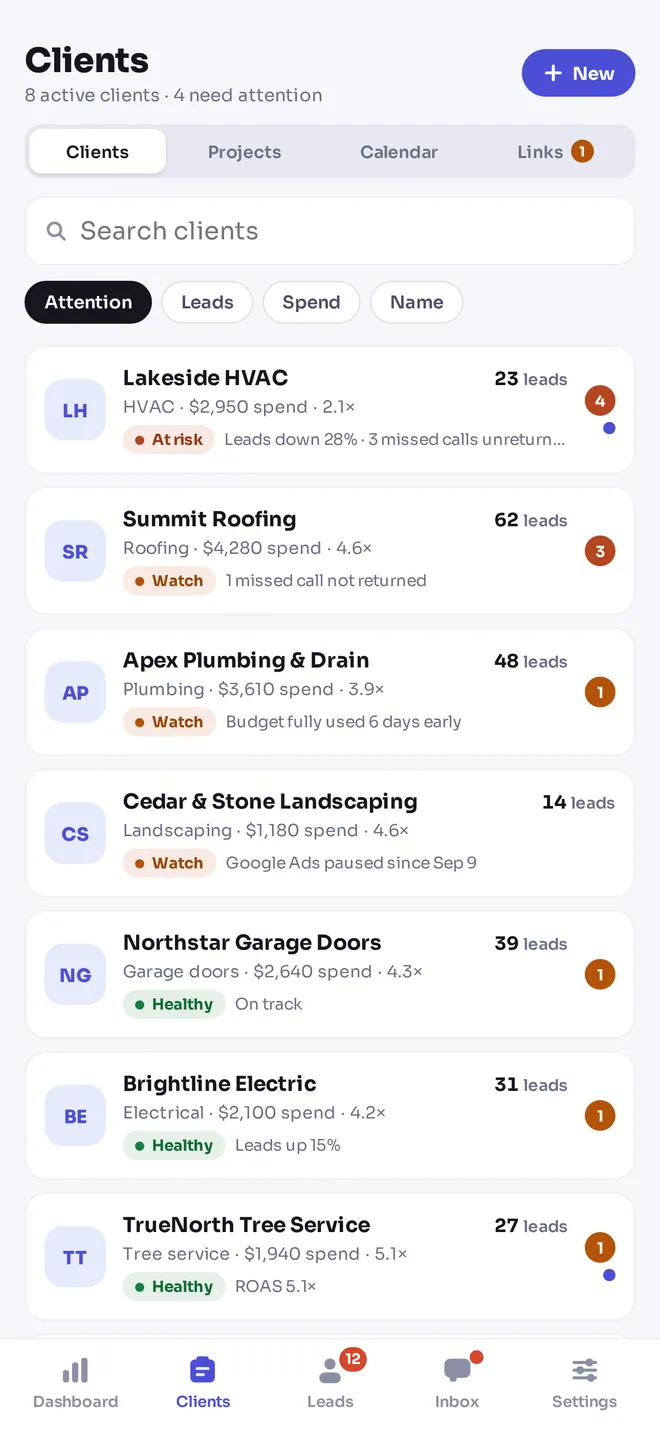
A hub for every client, their projects on a board, appointments and links.
Onboarding links
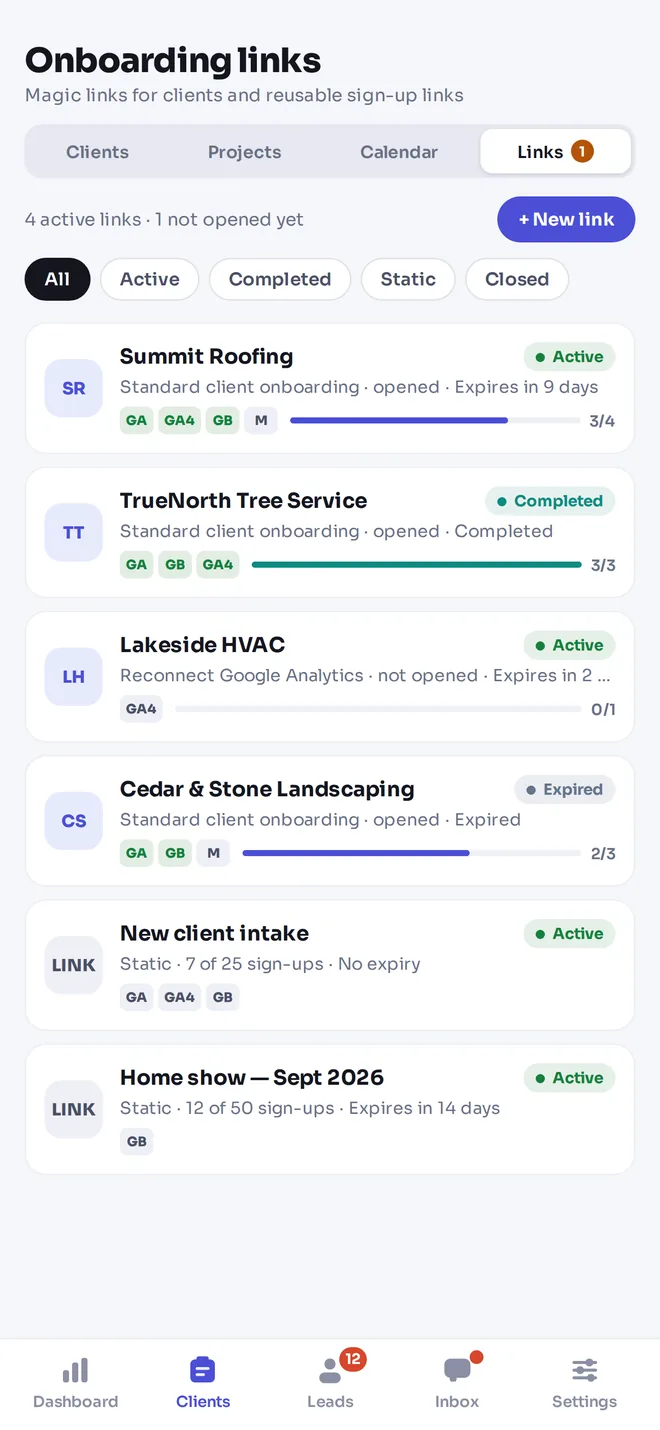
Create a link for a client in a few taps and share it by text or email.
Inbox
Every client conversation, searchable, with unread and waiting filters.
For your clients
The app your clients will actually open
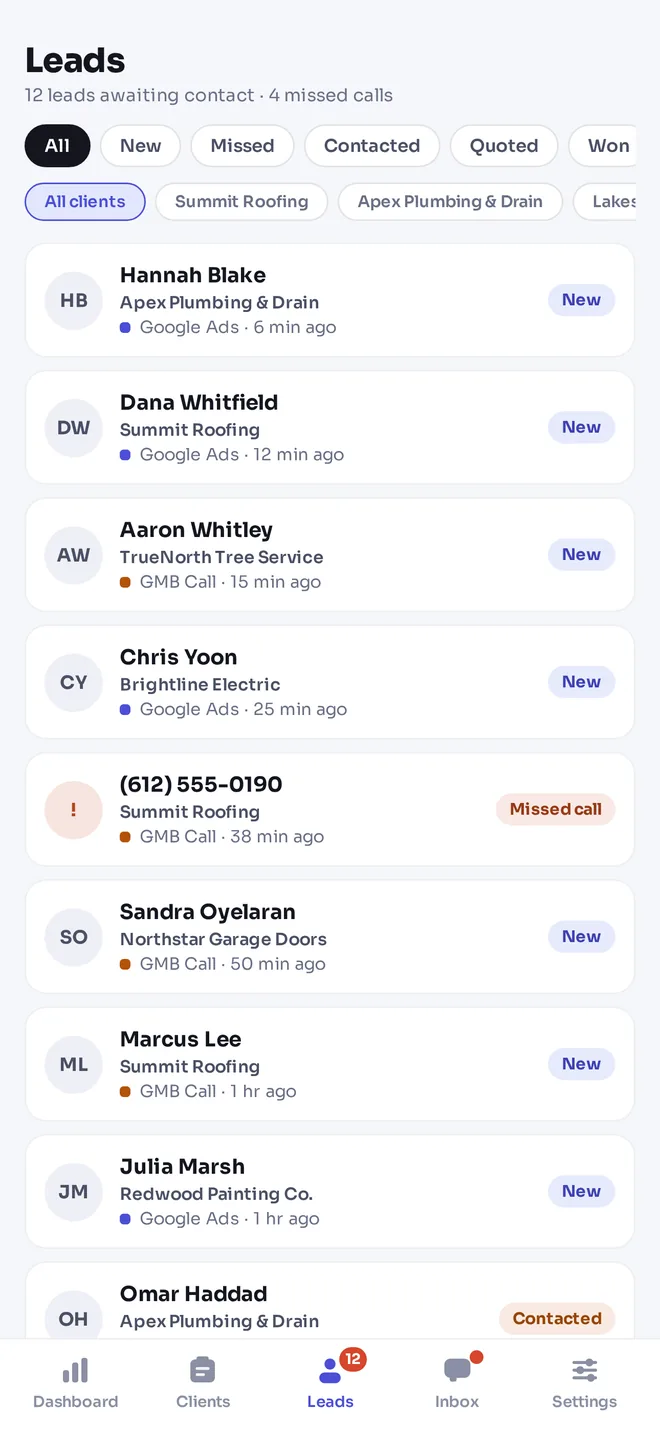
Leads are the moment a client cares most. The app puts each one on their phone the second it arrives, with the source attached, and makes the next step one tap.
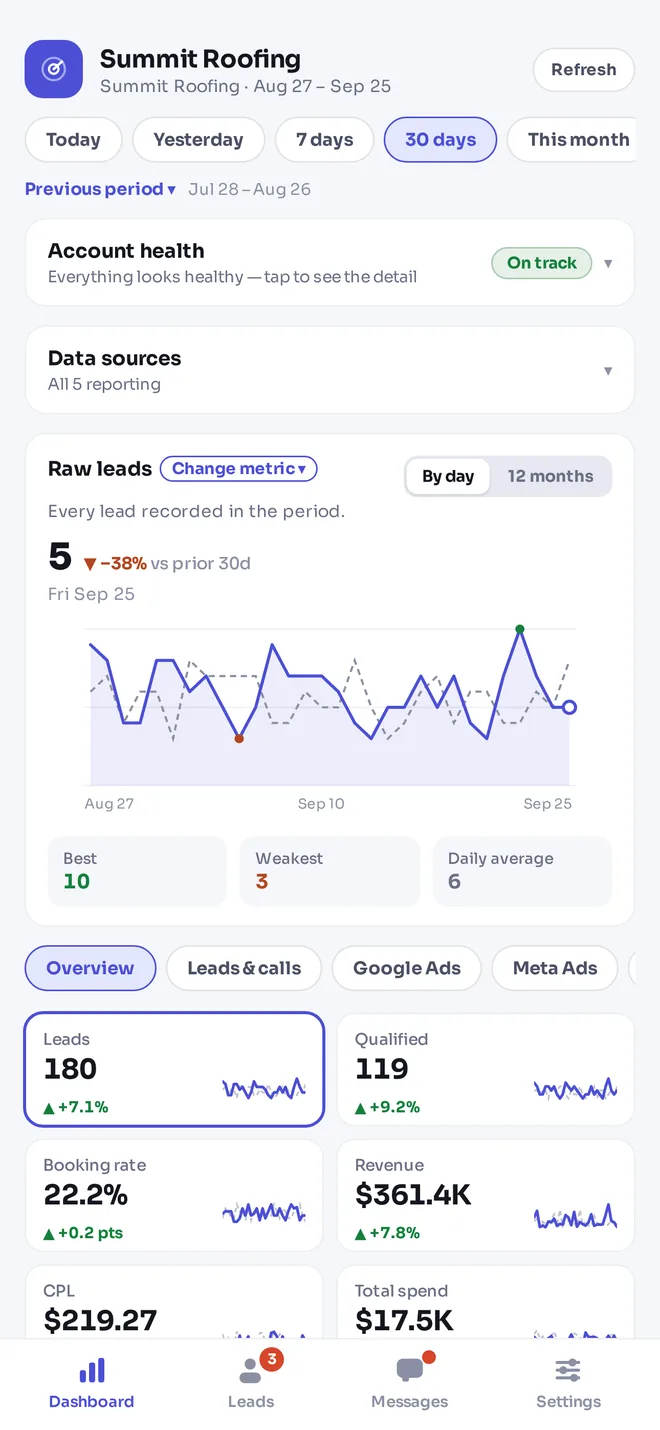
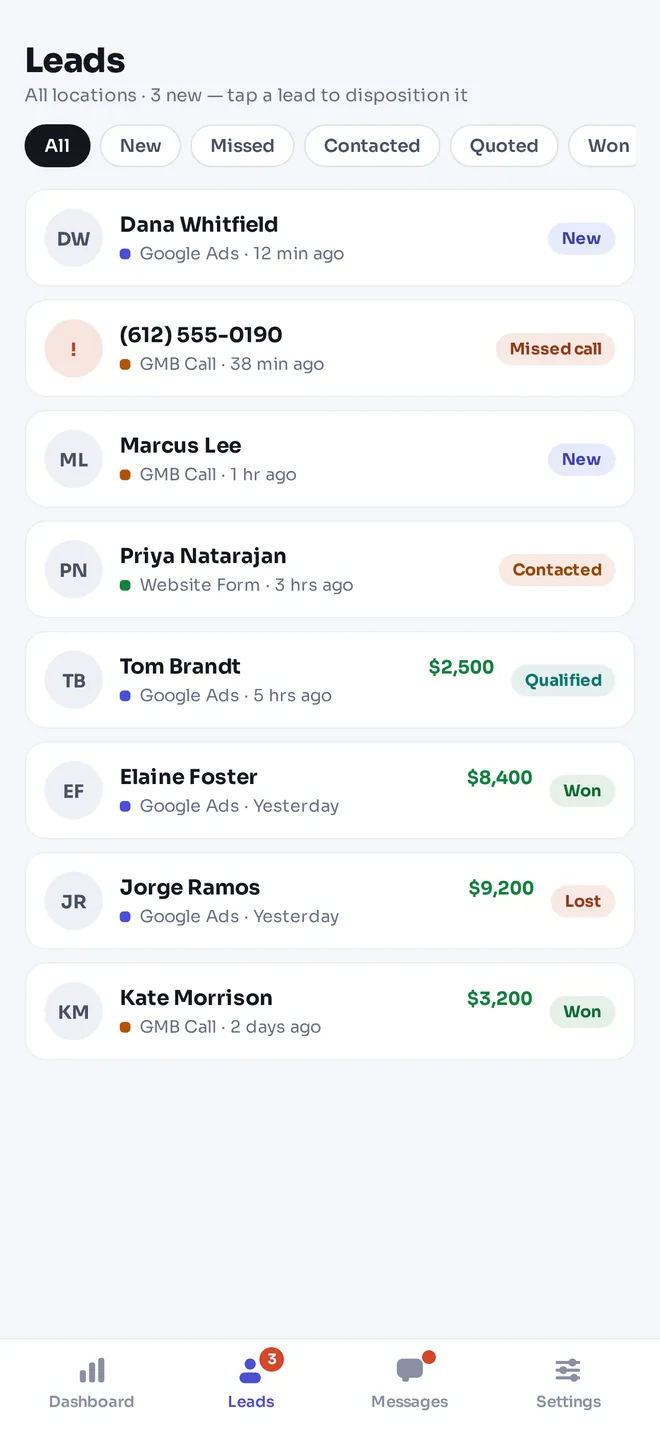
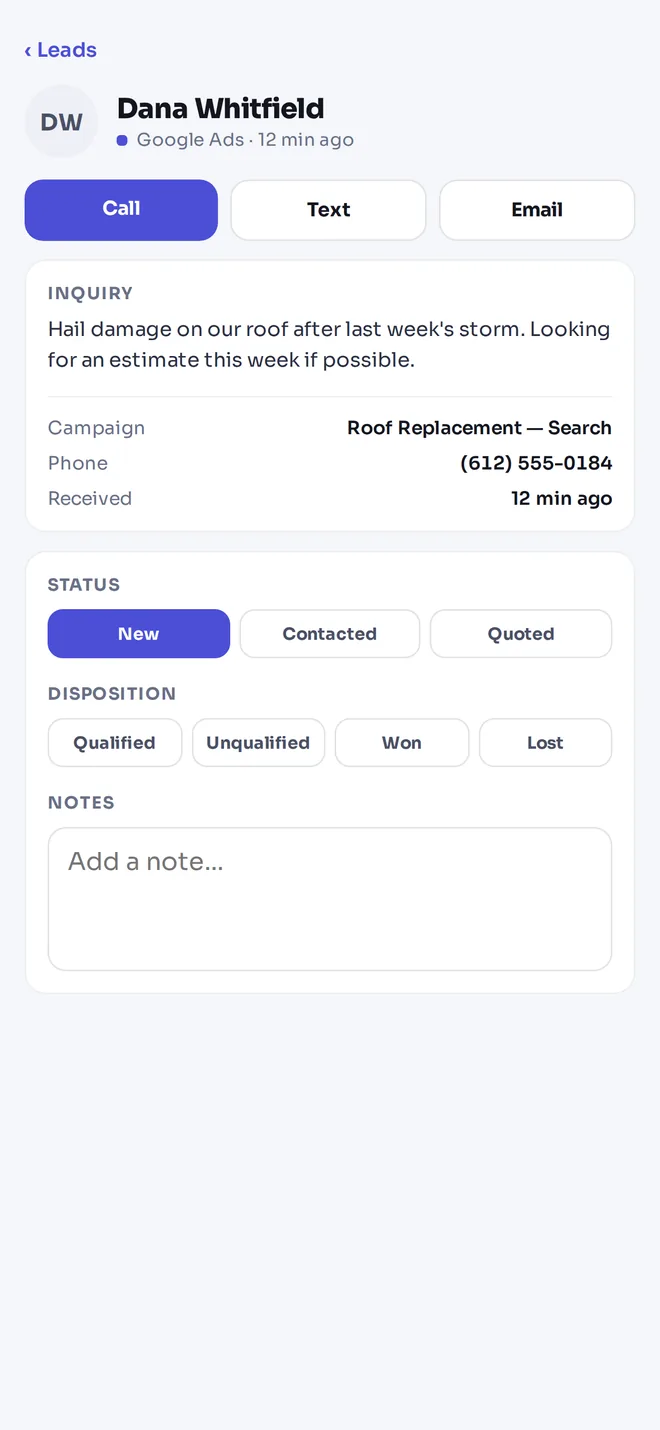
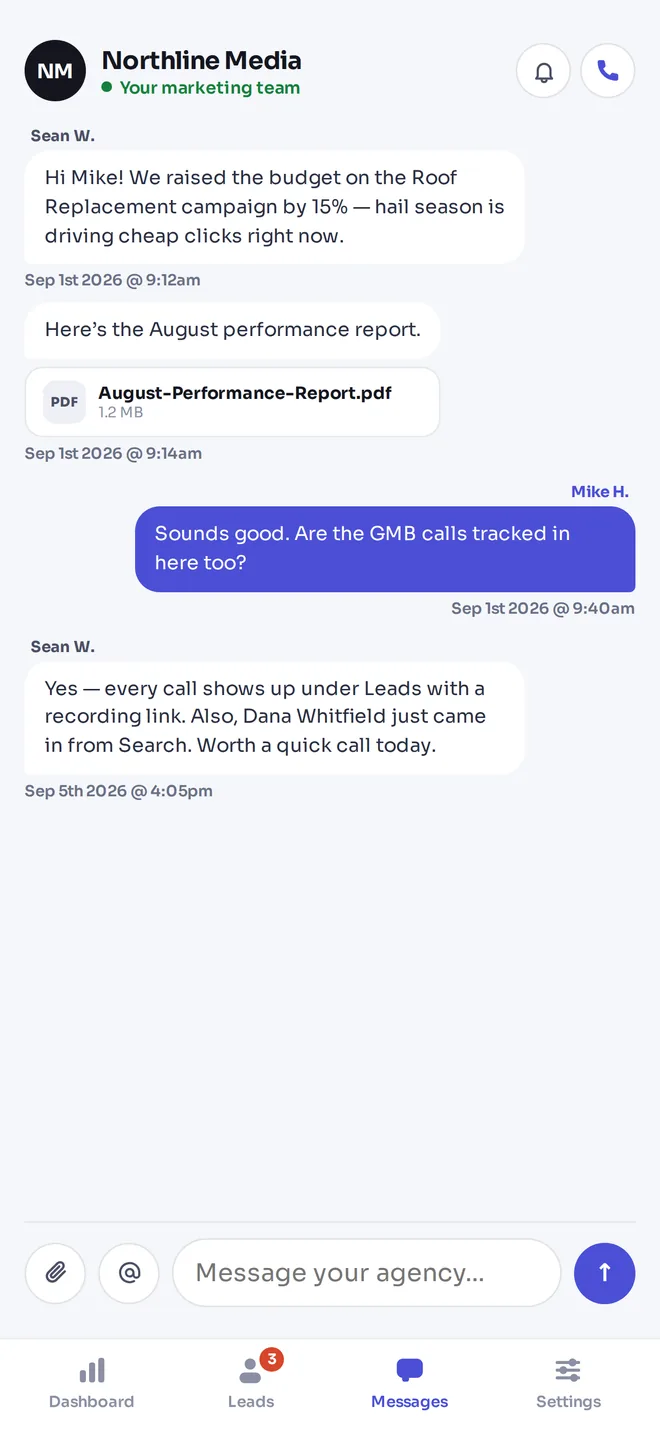
New-lead alerts
A push notification the moment a lead comes in, and a weekly performance recap every Monday.
Call, text, email
Reach the lead in one tap, straight from the lead.
Record the sale
Mark leads won or lost and record the job value — revenue and ROAS update for you.
Talk to the agency
Message your team, share files and see reports in one thread.
App questions
- Is there an Agency Pilot app for iPhone?
- LeadPulse is the Agency Pilot app for agencies and their clients: agencies see Mission Control across every client, clients see their own dashboard, leads and messages. The iPhone download is marked coming soon; check the download page for availability.
- Do my clients need to pay for the app?
- No. The app is free to download and client logins are free. LeadPulse is included on the Agency plan and above.
- Can clients sign up in the app?
- Clients sign in with the portal login you create for them, or with Google. Agencies can create an account in the app with email or Google.
- Is there an Android app?
- The Android download is marked coming soon. Android users can use the client portal in their phone's browser; it's built to work on small screens.
The app uses the same data as the web portal. See the client portal and Mission Control.
Put Mission Control in your pocket
Start a 14-day trial with 300 credits. Check the download page for app availability and use the web portal with the same account.
Use an agency mobile app for the moments between desk work
An agency mobile workflow should make a small number of useful actions easier: checking a client requiring attention, reading a new enquiry, responding to a message, or reviewing an outcome. The mobile experience described here brings agency oversight and client follow-up closer to the people responsible for acting. Before rollout, use the download page to check current store availability and device requirements.
Start with the task rather than the download. An account manager may need a quick cross-client view, while a business owner may want to respond to an enquiry without opening a laptop. Those are different roles. Introduce each person to the relevant experience and explain what action should follow the information they see.
Make lead updates part of the mobile handoff
A phone can help a client respond while away from a desk, but the workflow still needs clear ownership. Decide who calls or messages a new enquiry and how the team avoids duplicate follow-up. When the outcome is known, update the lead and record the sale accurately. This provides better context for the agency than a notification alone.
Keep detailed analysis in the right setting. A quick mobile review can identify a question without resolving every reporting issue immediately. Check the source, period, and client context before responding to a surprising number. Use the app as a way to stay connected to client work, with a clear handoff to deeper investigation when necessary.
Before expanding to more accounts, ask one agency user and one client contact to describe the same lead handoff. Their answers should identify a responsible person and a clear next update. If they describe different expectations, resolve that process first. Mobile access is most useful when it makes an agreed action convenient, rather than exposing an unresolved responsibility more quickly.
Build a mobile routine that supports timely follow-up
Decide which work genuinely benefits from a phone. Reviewing a new lead, checking which client needs attention, and responding to a message are natural candidates. Complex research or detailed reporting may still be easier on a larger screen. Agree on the actions people should take after an alert so notifications do not become another passive feed. For a client, that might mean opening the enquiry, checking whether someone has already responded, and recording the next outcome. For an agency account manager, it may mean checking context before contacting the business.
Test the routine with the actual device and account role. Confirm that the person understands which business they are viewing and where to ask for help. Review notification settings thoughtfully and do not assume a push alert proves a message was read or an enquiry was handled. Keep an agreed fallback for situations where a device is unavailable or an account cannot be accessed. At the next client review, ask whether the mobile workflow helped the team act and whether outcomes were recorded consistently. That feedback is more useful than measuring adoption only by the number of downloads.
Agree who acts after the phone alert
Discuss the moment after an enquiry becomes visible. Who checks whether it is relevant, who contacts the prospective customer, and who updates the outcome? A mobile alert does not answer those questions. For a business with several staff members, agree how they avoid duplicate contact or an unclaimed lead. Define when the agency should be asked for help and when the matter belongs to the client’s sales or service team.
Test the arrangement with a harmless example before depending on it during live delivery. Ask the responsible person to explain what they would do if they are unavailable or cannot access the device. Establish a sensible fallback through the client’s own operating process. Review the outcome information during the regular agency conversation, particularly if reported sales appear incomplete. The mobile experience can make information easier to reach, but it should support a responsibility that people already understand. Keep the process simple enough to follow when the client is busy with customers. A clear response owner and an accurate update are more valuable than a collection of alerts that nobody knows how to handle.
Avoid making a campaign decision from a quick glance
A mobile dashboard is convenient precisely because it can be opened between other tasks. That also makes it easy to react before checking context. When a figure looks surprising, confirm the business, period, source, and metric definition. Ask whether the underlying lead outcomes have been updated. A change in an incomplete record should not automatically trigger a confident explanation to the client or a campaign adjustment.
Use the mobile view to identify the next question. An account manager might note a change in enquiries and then review the detailed account from a larger screen. A client might see recorded revenue and realise several completed jobs still need an outcome update. Agree on those responsibilities during introduction. Keep a short record of any issue that needs further investigation so it does not disappear among notifications. If a client asks for an immediate interpretation, acknowledge the observation and explain what must be checked. This preserves the benefit of convenient access without pretending that every business question can be answered from a single summary number while away from the desk.
Introduce the mobile view with a real enquiry example
Check current availability and device requirements before asking the client to install anything. Once the supported access route is established, show a representative enquiry and the actions the responsible person needs to take. Explain how to identify the business, review the information, and record an outcome. Ask the client to repeat the task while help is available. This reveals practical questions that a screenshot or a download link alone cannot answer.
Keep the introduction tailored to the person. An owner who reviews performance may not handle every enquiry, while an office manager may be responsible for daily updates. Clarify who should receive attention and who should take action so two people do not assume the other has responded. Include the web portal as an alternative route where appropriate, and explain where to ask for help with sign-in or a confusing result. At the next account review, ask whether the mobile routine worked during an ordinary busy day. Use that experience to refine the instructions. The objective is a reliable client task completed in the right context, rather than installation as an end in itself.
Frequently asked questions
Where should I check whether the app is available?
Use the site’s download page for current store links and availability. Availability can differ by platform, so check the specific device your team or client uses. Do this before including installation in an onboarding deadline. The marketing workflow description should not replace a check of the actual download status.
What is a useful first mobile task for an agency?
Choose a simple task such as reviewing a client requiring attention or reading a recent conversation. Confirm the account and context before acting. A short task establishes whether the mobile workflow helps your role. Broader setup and detailed analysis may still be easier to complete in the web application.
What is a useful first mobile task for a client?
Show the client how to open a representative enquiry, understand its source, and record the next outcome. Explain who else may be handling the same business workflow. The goal is a reliable response process. Installing the application without agreeing on responsibility does not ensure enquiries will be handled.
How should notification expectations be set?
Agree which events deserve attention and what the recipient should do after opening an alert. Review device and application settings during setup. Do not treat a notification as evidence that a lead was contacted or a message resolved. Keep a practical fallback for times when the device is unavailable.
Can mobile lead updates improve reporting context?
They can make it easier for the responsible person to record what happened while the information is fresh. The usefulness still depends on accurate and consistent updates. Agree on status meanings and sale values with the client. Incomplete records should remain visible as a limitation when discussing performance.
Should clients use the same login as the agency?
Agency and client experiences serve different responsibilities. Use the appropriate authorised account for the person and business involved rather than sharing a team identity. Confirm the intended role during onboarding. The portal page explains the client-facing view and its relationship to the agency workspace.
What should I do if a client cannot sign in?
Check that they are using the intended account identity and the correct application or portal destination. Follow the supported sign-in or recovery flow, and contact support with a clear description if the issue remains. Do not ask the client to email passwords, verification codes, or other authentication secrets.
How should I introduce mobile access to several clients?
Pilot the instructions with one representative business first. Confirm the current platform availability, relevant plan, sign-in path, and first task. Use the client’s feedback to improve the introduction. Then roll out in manageable groups so questions can be answered without disrupting routine agency delivery.
Does a mobile dashboard replace a monthly explanation?
No. A dashboard offers convenient access to information, while the agency still explains important changes, limitations, and decisions. Use the mobile view to support ongoing awareness. Keep a review cadence appropriate to the service so a client is not expected to infer strategy from a collection of numbers.
How can I avoid responding to a number without context?
Check the client, metric definition, source, and date range before drawing a conclusion. If you need a more detailed view, note the question and investigate in the web application. A prompt acknowledgement can be useful without pretending that a quick glance explains the full performance picture.
What should clients record after a sale?
Record the outcome and the appropriate job or sale value according to the process agreed with the agency. Keep the update accurate and avoid duplicating the same outcome. If the business uses a different system as its primary sales record, clarify how the two workflows should be reconciled.
How do mobile and web access fit together?
Use each for the work it handles comfortably. Mobile access can support quick review and follow-up; the web workspace can provide room for detailed research and setup. Confirm the supported task in the relevant product page. Do not assume every desktop workflow has an identical mobile interaction.
Should I promise an Android or Windows release date?
Only use a release date that has been explicitly published for the relevant application. Check the download pages for current availability. A coming-soon label is not a delivery commitment. If a platform is essential to your rollout, ask the team directly before making it part of a client promise.
What information helps support investigate an app problem?
Provide the application version if available, device and operating system, the account role, steps taken, and the observed result. A sanitised screenshot can help. Exclude passwords, tokens, and unrelated client records. Explain whether the issue happens consistently or only during a particular task.
How should I measure whether mobile access is helping?
Look at the actual workflow: whether responsible people review enquiries, record outcomes, and resolve questions consistently. Ask users which task became easier and where they still switch to another channel. Download counts alone do not show that follow-up improved. Adjust the routine based on observed use.