
Client portal
Fewer "any update?" emails
Give every client a login of their own, on the web and on their phone. They see their numbers, leads and reports whenever they wonder — and what they see is strictly theirs.
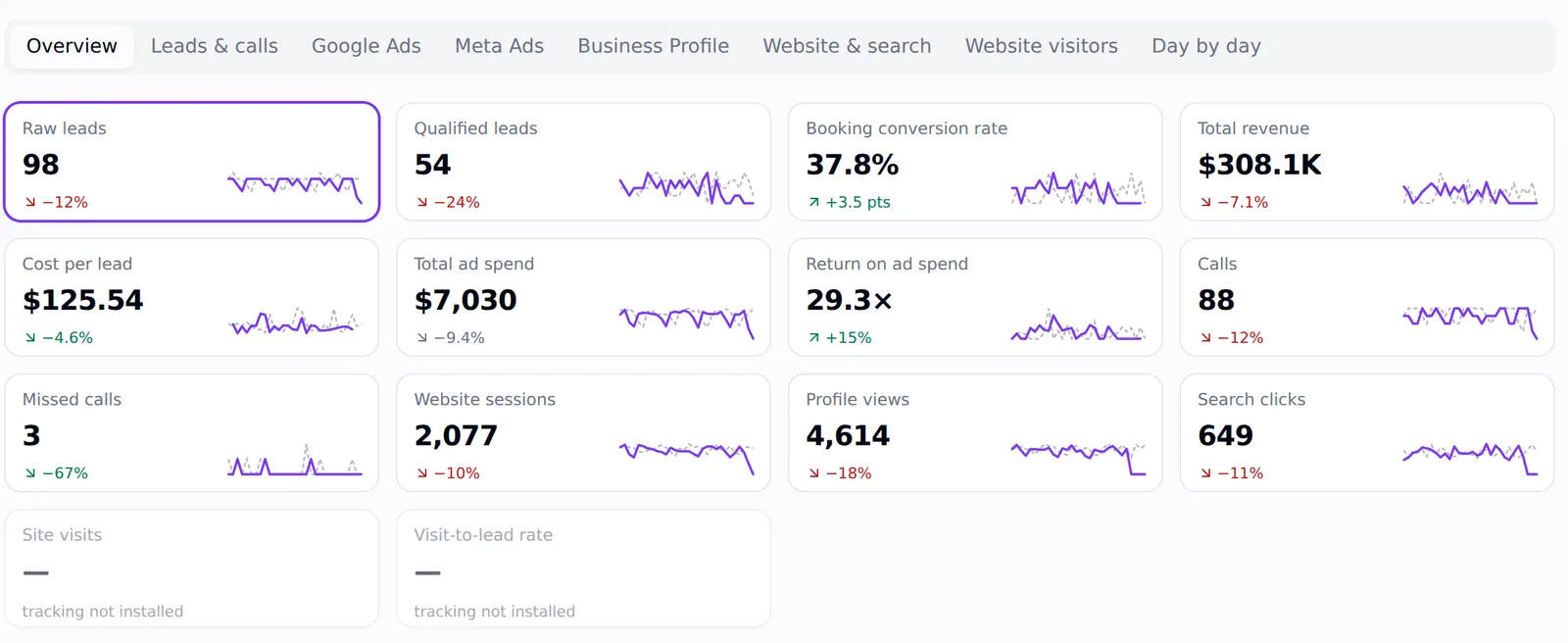
The question behind most client emails is "is anything happening?"
A portal answers it without you. The client sees leads arrive, numbers move against last month and the reports you've shared, the moment they wonder — and the conversations you do have move on to something worth discussing.
It does quiet work at renewal time too. A client who has watched the lead count and revenue climb all year doesn't need convincing in month twelve.
What they see
Everything about their account, nothing about anyone else's
Their Mission Control
Leads, bookings, revenue, cost per lead, ad spend, ROAS, calls, website sessions and profile views — against last period, any time.
Their leads
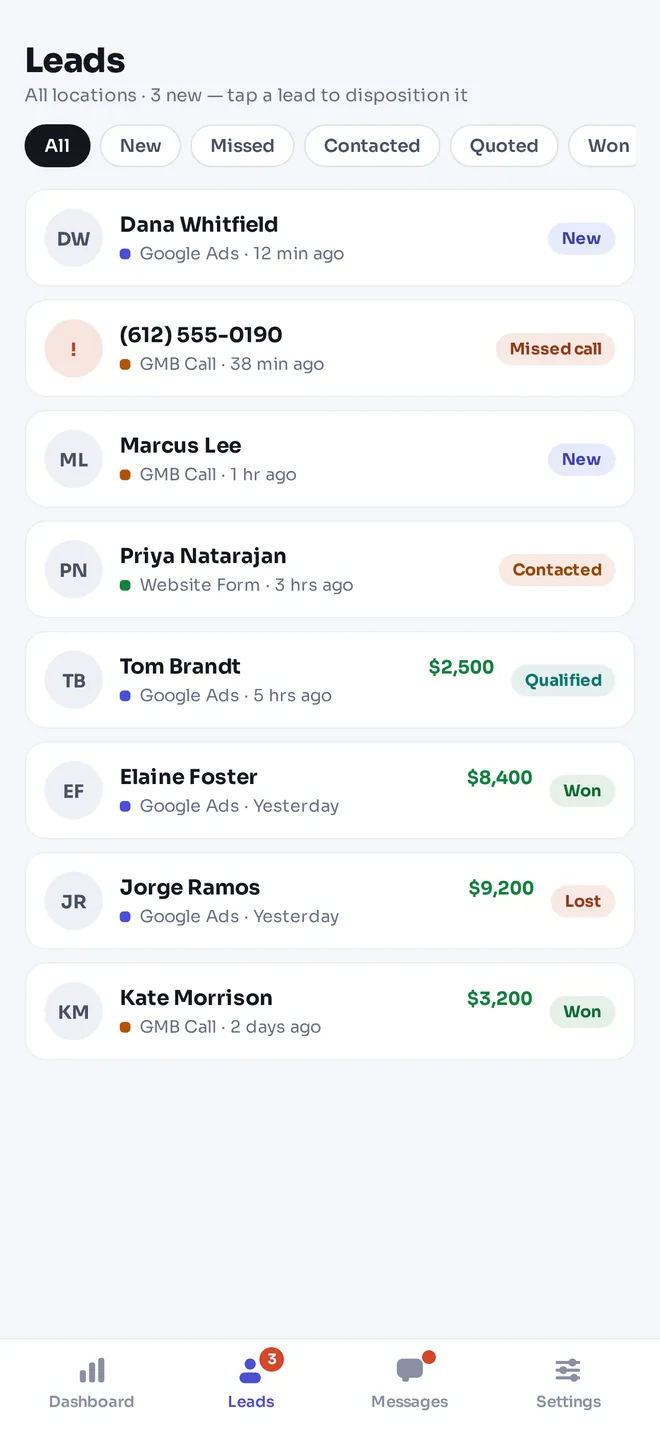
Every lead as it arrives, with its source. They update the status, add notes and record the sale when a job closes.
Their reports
SEO audits and geo-grid reports you've made visible, plus custom report views you share.
Their invoices
What's been billed and what's due — and a Pay now button through your own Stripe account.
Support and messages
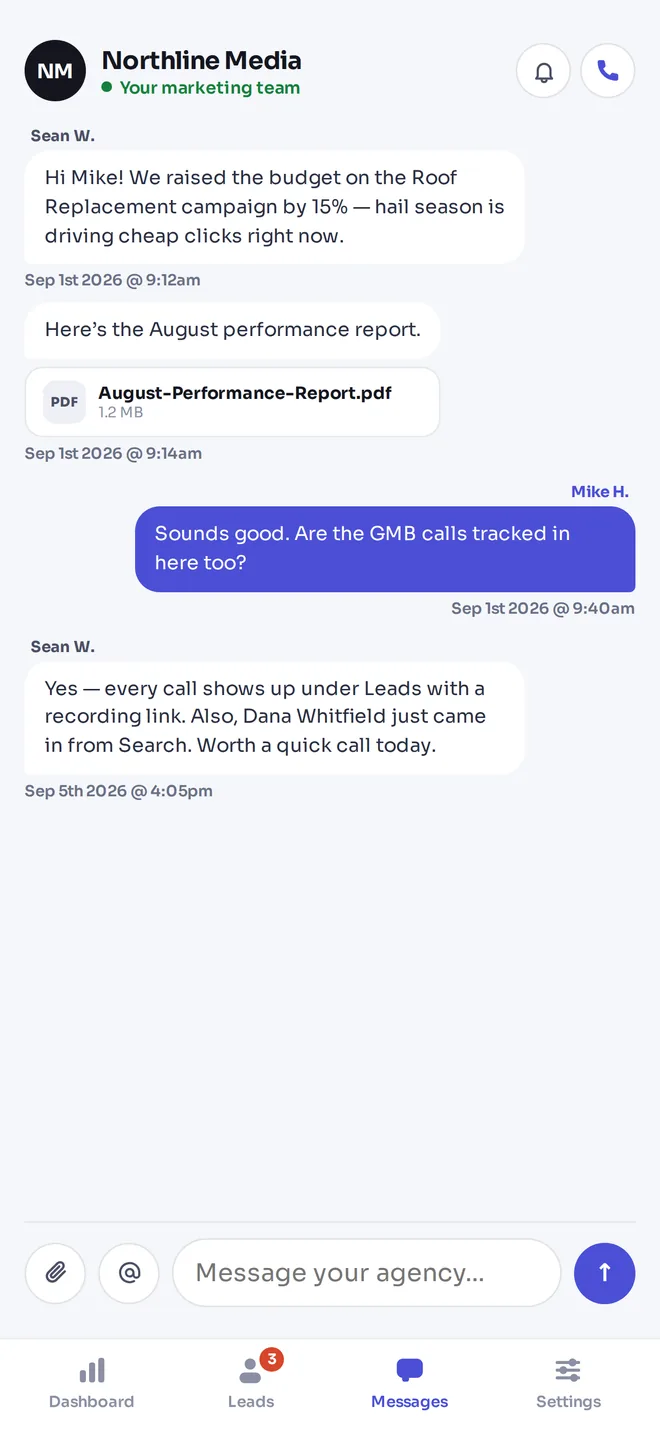
Tickets with a queue and SLA, and your conversation with them, instead of texts to your personal phone.
Their agencies
The portal belongs to the business. They approve, decline or disconnect the agencies connected to it.
In their pocket
The portal in the LeadPulse app
New leads buzz their phone the moment they arrive, with the source attached. They tap to call or text back, mark the lead won or lost, record the job value, and message your team — all without opening a laptop.
Control
Access you can explain to a client
One client, one view
A portal login is scoped to a single business. It can't reach another client's records, and it can't reach your agency workspace.
Enforced in the database
The restriction is a row-level security policy, not a hidden menu item — it holds even if someone goes looking.
Your name on it
The portal shows your agency's name and logo, and your internal notes, other clients' invoices and your tasks never appear.
On their phone
The same portal in the LeadPulse app for iPhone, with push alerts for new leads and a weekly summary.
Invoices they can pay
Connect your own Stripe account and every invoice in the portal gets a Pay now button. Payments land in your Stripe account, invoices update themselves, and overdue ones show up in Mission Control.
Client portal questions
- What is a client portal for a marketing agency?
- A login where each client can see their own marketing results, leads, reports, invoices and messages without emailing the agency — scoped so they only ever see their own business.
- Do portal logins cost extra?
- No. Client portal logins are free on every plan, and LeadPulse app logins are free on the Agency plan and above.
- Can clients record sales?
- Yes. On any lead they can change the status, add notes and record the job value, which feeds revenue and ROAS on your side.
- Can a client work with more than one agency?
- Yes. The portal belongs to the business, and they choose which agencies are connected to it.
Give your clients a login they'll use
Start a 14-day trial with 300 credits. Portal and app logins for your clients are always free.
Make a client portal for marketing agencies part of delivery
A portal is useful when the client knows why to open it. Begin with the task they care about most: reviewing a new enquiry, checking a report, finding an invoice, or asking the agency a question. Agency Pilot gives each business its own view, while the agency works across its client accounts. Use that separation to keep the client experience focused on information and actions relevant to their business.
Do not introduce the portal as another dashboard the client is expected to interpret alone. Explain what each important measure means, which period is shown, and how it connects to the service. The strongest portal routine combines easy access with an agreed review process. Clients can check information between meetings, and meetings can focus on decisions.
Connect lead visibility with responsible follow-up
A new lead is valuable only if someone handles it appropriately. Decide who reviews incoming enquiries, who makes contact, and who updates the outcome. The portal lets the client work with lead status, notes, and recorded sale value. Agree on what those updates mean before relying on them in a performance discussion.
Treat incomplete outcomes as a data limitation. If the business has not recorded which enquiries became jobs, a revenue view may not tell the full story. Use the client conversation to improve that record rather than assuming every unanswered lead failed. A shared process gives the agency better context for campaign decisions and gives the client a clearer responsibility in the result.
Design a portal introduction around one client task
Start with the person who will use the portal most often. A business owner may want a quick view of enquiries and revenue, while an office manager may need to review new leads throughout the day. Ask what they currently do when a new enquiry arrives and which information they need to respond. Then show that exact workflow in the portal. Keep the introduction focused on the client’s responsibilities rather than demonstrating every area of the agency’s system. A client who can complete one useful action has a stronger starting point than one who has watched a long tour.
Prepare a short welcome note with the portal destination, the account identity they should use, and the agreed place for questions. Explain which reports you will share and how often you will discuss them. If several people work at the business, clarify who owns updates so the same enquiry is not handled twice or ignored. Revisit the introduction after the first reporting cycle. Ask whether the client found the needed information and whether the lead outcomes reflect reality. Their answers help you improve the working arrangement without adding unnecessary complexity to the dashboard.
Make the handoff between agency and client explicit
Many delivery problems appear at the boundary between two teams. The agency assumes the client will call a new enquiry; the client assumes the agency has already done it. Agree on who reviews incoming leads, who records outcomes, and when unanswered questions should be escalated. Use language that fits the client's business. A home service company may talk about estimates and booked jobs, while a consultant may talk about discovery calls and accepted proposals. The labels in a dashboard are useful only when the people behind them understand the same process.
Introduce the client-facing view with a short walkthrough using that client's own account. Show the information they can see, the actions you expect them to take, and where to send a question. Ask them to complete one task while you are available, rather than relying on a long welcome email. Then write a brief operating note covering the routine: review leads, update an outcome, read the shared report, and contact the agency when something looks wrong. Review the arrangement when staff change or services expand. A portal or app supports this agreement; it does not make an unclear division of work disappear.
Explain the portal’s numbers before the first review
Choose the few measures that the client will use to judge the service and define them together. A lead, a qualified enquiry, a booking, and a recorded sale represent different stages. Show where each number comes from and which date range is displayed. Explain that client updates affect the completeness of outcome information. This prevents the portal from becoming a source of arguments about figures that are being interpreted in different ways.
Use a realistic example from the agreed workflow. A new enquiry might arrive this week and become a job later; the two events do not necessarily belong to the same reporting period. If a number differs from another system, check the definitions and source before deciding one is wrong. During the first review, ask the client to describe what the main measures mean in their own words. Clarify any mismatch and record the agreed explanation in the welcome instructions. The portal should give the client convenient access to information, while the agency remains responsible for helping them understand the context. A small shared vocabulary can make subsequent reviews more useful than adding another chart whose purpose is unclear.
Frequently asked questions
Who should be introduced to the portal first?
Start with the person responsible for the client’s daily marketing follow-up or agency relationship. Ask which task would make their work easier and demonstrate it in their own account. Once the routine is clear, introduce other authorised participants as appropriate. Keep responsibility for lead updates and questions explicit.
How should I explain the client dashboard?
Begin with the business question behind each measure, such as whether enquiries are arriving or recorded sales are changing. Identify the period and source before comparing numbers. Explain any missing connection or incomplete outcome data. The aim is to help the client make a decision, not simply to familiarise them with every chart.
What should a client do when a lead arrives?
Follow the response process agreed with the agency: review the enquiry, contact the person through the appropriate channel, and update the status or notes. When a sale is completed, record the relevant value accurately. The portal supports the record, while the business still needs a person accountable for timely follow-up.
Can the portal replace every reporting meeting?
It can reduce requests for information that is already available, but interpretation and planning still benefit from conversation. Use meetings to discuss meaningful changes, completed work, and decisions. Direct clients to the portal for routine access to their information. The right cadence depends on the service and the client’s needs.
How do I decide which reports to share?
Share reports that support the agreed service and answer a question the client can understand. Review the output first, add context where needed, and check that the relevant client has access. A large volume of unexplained research can confuse the discussion. Prefer a clear report with a useful next action.
What is the difference between portal access and provider access?
The portal lets the client view their business information in Agency Pilot. Provider permissions govern access to accounts such as Google or Meta. These are separate relationships with different controls. Explain both during onboarding and review both during offboarding rather than assuming one setting changes every form of access.
How should the agency handle an unexpected number?
Check the account, date range, source, and completeness of the underlying data. Ask whether the client changed business operations or has outcomes still to record. Explain the uncertainty while investigating. Avoid immediately changing strategy because a single dashboard number differs from a client’s memory or another system.
Can invoices be paid through the portal?
The portal supports invoice payment through the agency’s connected Stripe account. Check your billing setup and the invoice before directing a client to pay. Agency Pilot subscription billing and the invoices your agency sends to clients are separate matters. Keep that distinction clear when answering a payment question.
What should a portal welcome message include?
Include where to sign in, the identity to use, the first task to complete, and where to ask for help. Explain which information the client can find and what updates you expect from them. Avoid including passwords or unnecessary personal data. A short practical welcome is easier to act on than a feature catalogue.
How can I check that the portal is useful?
Ask the client to find a report or update a representative lead and observe where they hesitate. After the first cycle, ask whether they could find the information they needed without requesting another copy. Use that feedback to improve instructions and reporting context rather than adding more dashboard material automatically.
Should clients update every lead in the same way?
Agree on a consistent meaning for statuses and sale values across the people handling enquiries. The specific business process may vary, but inconsistent updates make reporting harder to interpret. Document a short example for common outcomes and review uncertain cases with the client before treating the record as complete.
How should staff changes at the client be handled?
Review who should have access and who now owns the recurring tasks. Introduce the replacement contact to the portal and confirm the business’s preferred escalation route. Also review provider permissions where relevant. A staff transition is a good time to check that reports and lead outcomes still reach the right people.
What if the client prefers using a phone?
Review the mobile app page and download information for current availability and requirements. The web portal can also support a mobile browsing workflow. Choose the option the client can reliably use, and test a real task on their device. Do not assume installing an app by itself establishes a follow-up routine.
How should a client raise a reporting question?
Include the relevant report or dashboard, the date range, and the number or observation that needs explanation. A precise question helps the agency check the same context. Keep unrelated customer details out of the message. Use the agreed support or conversation route so the question remains connected to the working relationship.
What should be checked before wider client rollout?
Verify a representative client view, shared report, lead update, and billing workflow relevant to your service. Confirm instructions and ownership of recurring tasks. Review the plan for any associated mobile or communication features. Expand after the first client can complete the intended tasks with a clear understanding of what the agency expects.