
Skip to content
Agency Pilot

Protect ad spend · Add-on

Click-fraud protection

The same script that attributes leads watches every paid click: the network it came from, the device, how it behaved, and whether it came back again and again. Suspicious addresses are suggested for blocking, fake leads are flagged before anyone calls them, and blocked IPs go straight into the client's Google Ads exclusions.

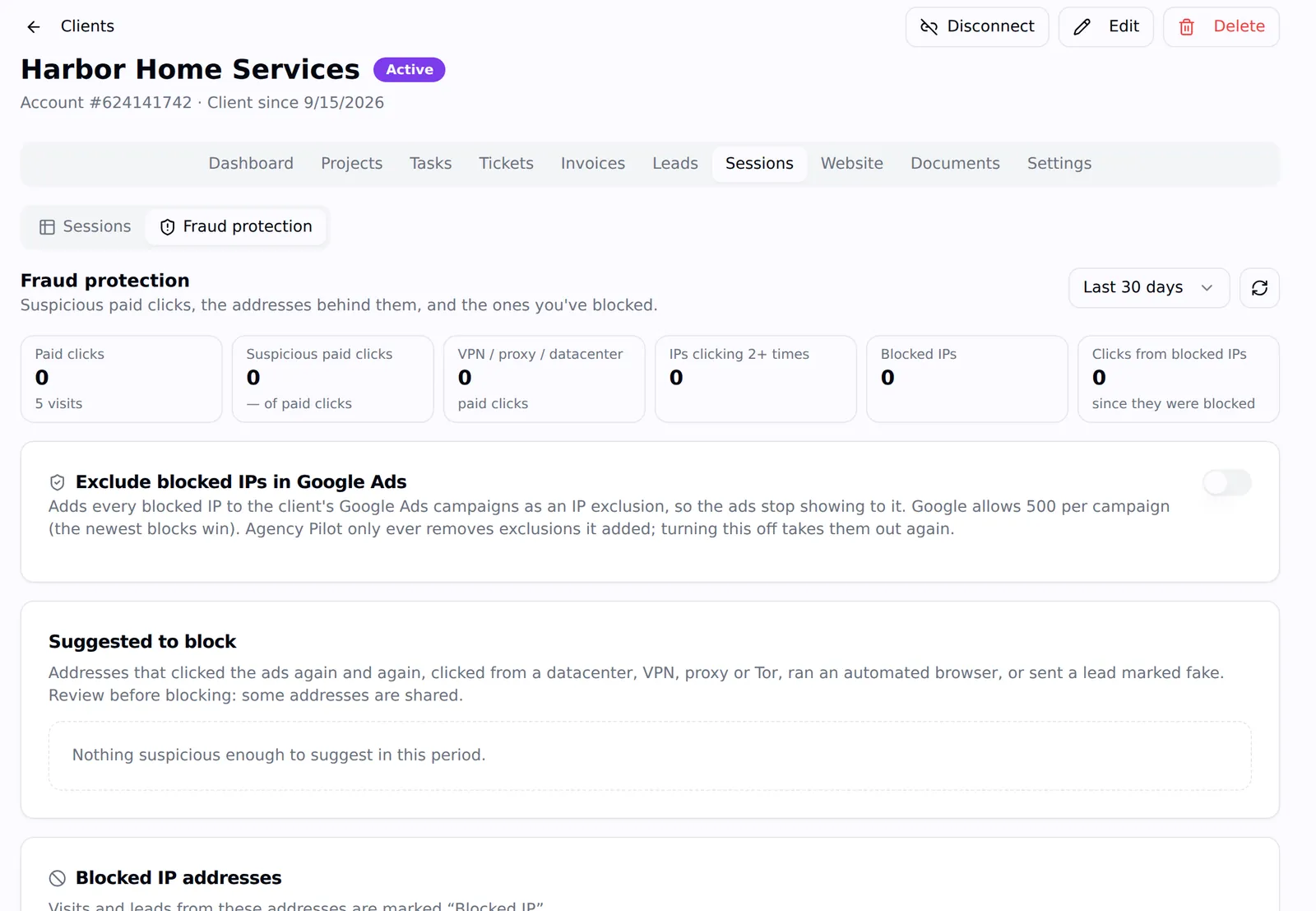
The Fraud protection view for a client: paid clicks, suspicious paid clicks, VPN or datacenter clicks, repeat clickers, blocked IPs, the Exclude blocked IPs in Google Ads switch, suggestions and the blocked list
Fraud protection for one client: what looks wrong, what to block, and the Google Ads switch.

IP intelligence on every visit

Datacenter, VPN, Tor, proxy, abuse lists, iCloud Private Relay, carrier and network type, stamped on each visit.

Repeat paid clickers

IPs and devices clicking the client's ads again and again, counted and flagged.

Bots and headless browsers

Automation signs, device fingerprints and behaviour that doesn't look human.

Fake-lead checks

Throwaway emails, made-up phone numbers, keyboard-mash names and spam pitches, flagged on the lead.

Blocked in Google Ads

Blocked IPs are added to the client's Google Ads campaigns as IP exclusions, newest first.

Smarter with every agency

A shared fraud network learns from fake-lead and real-customer labels, without any agency seeing another's data.

Every paid click, examined

Each visit records where it came from: the IP address and its /24 range, the provider and connection type, the mobile carrier, and whether the address belongs to a datacenter, a VPN or proxy service, Tor, a known abuse list or iCloud Private Relay. It also compares the visitor's time zone with the IP's location, checks the browser for automation, and counts visits and paid clicks from the same IP or device.

The Sessions view lets you filter to paid clicks, flagged visits, VPN and proxy traffic or repeat paid clickers, and open any visit to see exactly why it was flagged.
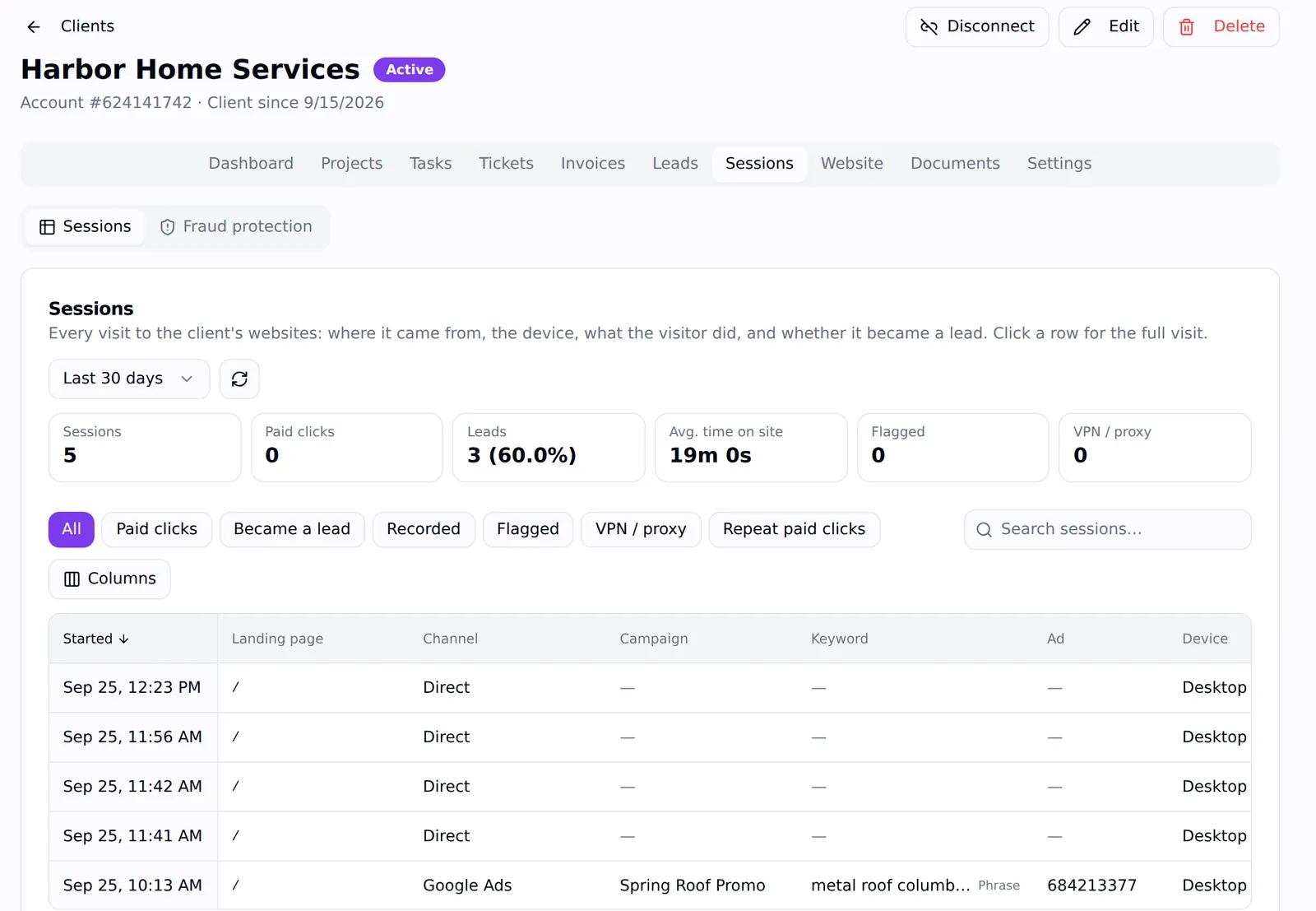
The Sessions table for a client with filters for paid clicks, became a lead, recorded, flagged, VPN or proxy and repeat paid clicks
Sessions with fraud filters: paid clicks, flagged, VPN / proxy, repeat paid clicks.

Fake leads caught before anyone calls

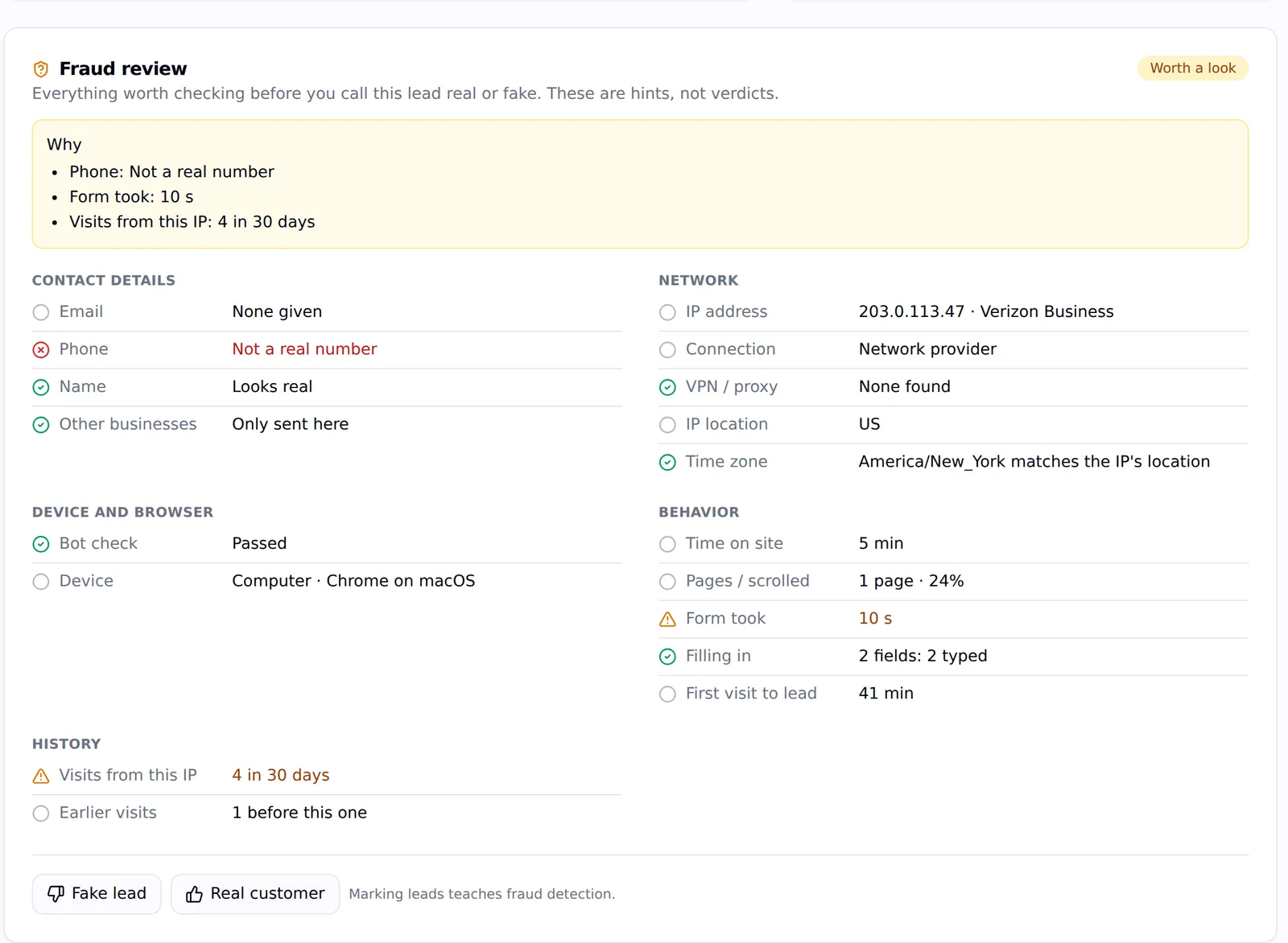
Every lead gets a fraud review: is the email real and deliverable, the phone number valid, the name plausible, the message spam? Did it come from a VPN or a datacenter, fill the form in two seconds, or share its email or phone with leads at five other businesses? The review says what's worth checking, in plain words.

Mark a lead Fake or Real customer and the label teaches the detection — for this client and, anonymously, for everyone.

The fraud review on a lead: phone not a real number, form took 10 seconds, four visits from this IP in 30 days, with contact, network, device and behaviour checks
A fraud review on a lead: the reasons, not just a score.

Block it where it costs money

Agency Pilot suggests addresses to block — ones that clicked the ads again and again, came from a datacenter, VPN, proxy or Tor, ran an automated browser, or sent a lead marked fake. Block them with a reason, or add your own. Turn on Exclude blocked IPs in Google Ads and every blocked address is added to the client's campaigns as an IP exclusion; Google allows 500 per campaign, so the newest blocks win.

A daily cross-check reads Google's own click records and invalid-click counts, so you can show a client what Google refunded and what it didn't.

What this does not do

Better to find this out here than three weeks in.

  • IP exclusions are pushed to Google Ads. Meta doesn't support IP exclusions, so Meta traffic is flagged and reported rather than blocked.
  • Google Ads allows 500 excluded IPs per campaign; beyond that, the newest blocks replace the oldest.
  • It's an add-on: $29 a month for 1 site, $99 for 5 and $249 for 15, counting paid clicks only.

Questions

How do you detect click fraud on Google Ads?
By examining each paid visit — its network, device and behaviour — and counting repeat clicks from the same IP or device, then comparing with Google's own click records. Suspicious addresses are suggested for blocking and can be pushed to Google Ads as IP exclusions.
Does it block bots automatically?
It suggests what to block and pushes everything you block to Google Ads. You stay in control of what's excluded, because blocking a real customer's office IP costs more than a few bad clicks.
Is my clients' visitor data shared with other agencies?
No. The shared fraud network uses salted, one-way hashed identifiers and labels; no agency can see another agency's visitors or leads.
How much does it cost?
It's an add-on on any plan: $29 a month for 1 site, $99 for 5 sites and $249 for 15. Only paid clicks are analysed and counted — and many agencies resell it to clients at a markup.

Stop paying for clicks that were never customers

Start a free trial, install the script, and see your clients' paid traffic in a new light.