Skip to content
Agency Pilot

Client onboarding

Get access to every client account with one link

Tick the platforms, choose the access level for each, send the link. Your client signs in where they need to and follows a short step where a platform has no API. You're told the moment it's done — and the same connections start filling their reports.

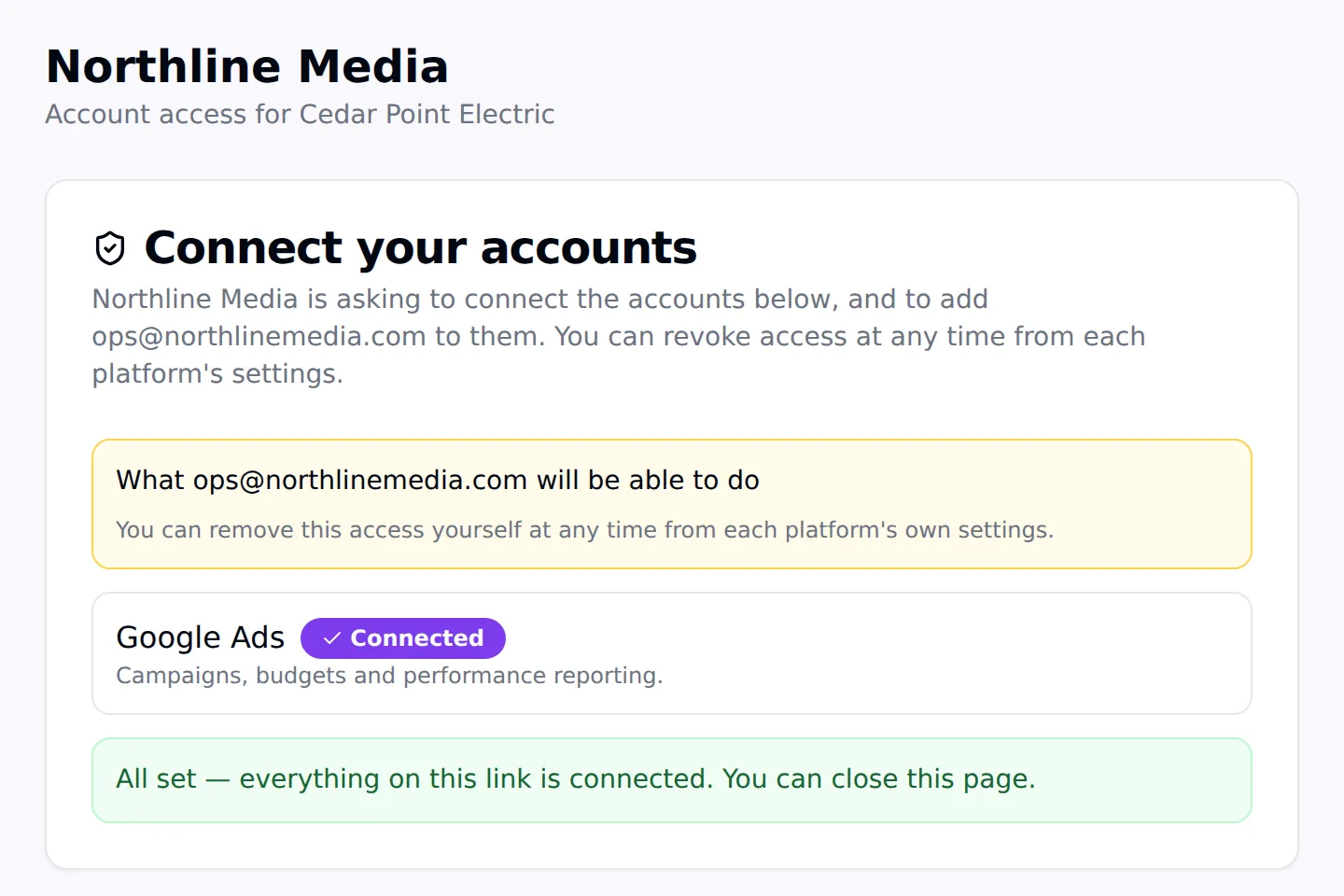
The page a client sees when they open an Agency Pilot onboarding link: the agency name, what access is being requested and a Connect button per platform
What your client sees: who is asking, exactly what for, and one Connect per platform.

Every platform on one link

Google Ads, GA4, Search Console, Business Profile, Tag Manager, Merchant Center, YouTube, Meta ad accounts and Pages, TikTok, LinkedIn, Snapchat, Shopify and website logins.

You choose the access level

Analyst on GA4, Edit on Tag Manager, Manager on Business Profile, Standard on Google Ads. Owner is never offered, on any platform.

Automatic where it can be

Where the platform allows it, your agency is added, invited or assigned as a partner the moment the client connects. No emails to chase.

Guided where it can't

Where a platform has no API, the link shows the exact steps with your email and the role, and the client taps I've done this.

No passwords, no over-granting

Clients sign in on each platform's own page. If a login reaches several properties, nothing is granted until the right one is picked.

Know when it's done

Every open, connection and grant is logged on the link, and your admins are notified when it completes or a prospect signs up.

The week of emails this replaces

Every agency knows the routine. The contract is signed, the kickoff is booked, and then it's a week of "can you add us to Analytics?", screenshots of the wrong menu, an invite sent to the wrong address, and a Business Profile that turns out to belong to the web designer from 2019.

An onboarding link turns that into one message. The client opens it, sees in plain words what your agency is asking for, and connects each platform in the order it's listed. Most finish in a few minutes, on their phone.
You decide what access you get

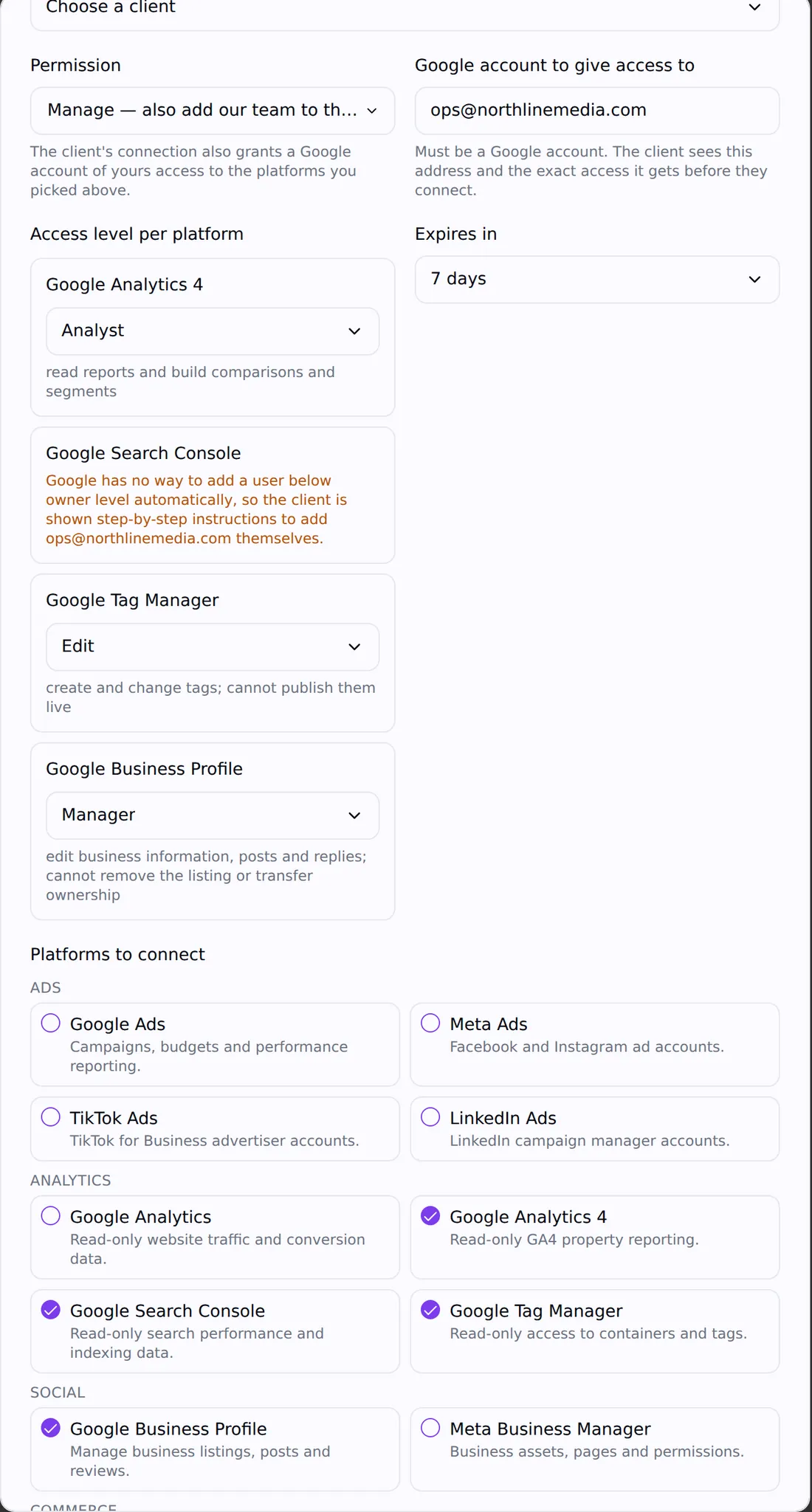
When you create a link you pick the client (or make it reusable), choose view or manage, tick the platforms and set the role for each. The roles are the platforms' own: Viewer, Analyst, Editor or Administrator on GA4; Read, Edit, Approve or Publish on Tag Manager; Standard, Read only or Admin on Google Ads; Manager on Business Profile; Manage campaigns or View performance on Meta.

The client's page lists every one of those in plain language before anything is connected, and each platform's own consent screen lists the permissions requested. Owner-level access is never on the menu.

The New onboarding link dialog with per-platform access levels for GA4, Search Console, Tag Manager and Business Profile
Per-platform access levels, set before the link goes out.

Automatic on the platforms that allow it

On Google Analytics 4, Business Profile and Tag Manager your agency's Google login is added straight to the property or account at the role you chose. Google Ads and Merchant Center send you an invitation from the client's account. On Meta, your business portfolio is assigned as a partner on the ad account and Page the client picks in Meta's own dialog.

If you listed several people — two Google logins, or more than one Meta Business ID — each is granted on the same property. If one fails, the connection says Partly added and names who is missing.

  • Google Analytics 4: added at Viewer, Analyst, Editor or Administrator
  • Business Profile: added as Manager
  • Tag Manager: added to every container at Read, Edit, Approve or Publish
  • Google Ads and Merchant Center: invitation at the level you chose
  • Meta ad accounts and Pages: your business portfolio assigned as a partner

Guided on the platforms that don't

Search Console can only add owners through its API, and YouTube, TikTok, LinkedIn, Snapchat and Shopify don't let apps add users on a client's behalf. For those, the link shows the client the exact steps with your email or ID and the role to pick, and they tap I've sent the invite or I've done this when they're finished. Reporting on Search Console still connects automatically the moment they sign in.

The same step library covers website and hosting access — WordPress, GoDaddy, Hostinger, Wix, Squarespace, or anything you write yourself — with an optional question such as the login URL. Passwords are never asked for.

Client links and reusable links

A client link belongs to one client and completes when every platform on it is connected and every step is done, then stays readable so the client can see what they shared. A reusable link is for prospects and sign-up flows: it asks for a business name, contact name, email and phone, creates the client, then runs the same connections — and you can cap how many sign-ups it accepts, from one to ten thousand.

Links don't expire unless you give them an expiry. Regenerate or revoke one at any time from the Onboarding page.

Access that gets used the same day

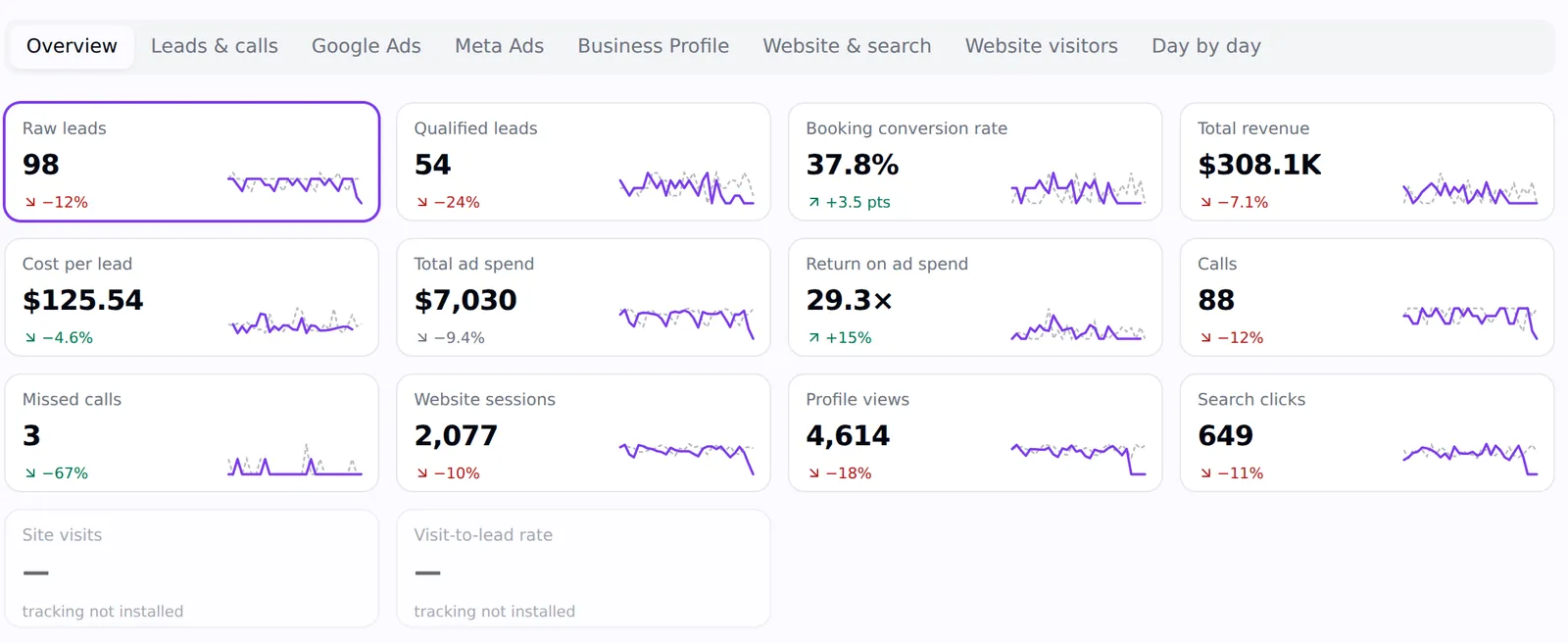
This is where a standalone access tool stops and Agency Pilot keeps going. The Google Ads, GA4, Search Console, Business Profile and Meta accounts the client just connected start syncing into their dashboard and your Mission Control within the hour, backfilling up to 400 days. Their listing is ready for geo grid scans, the Business Profile audit and review monitoring. And the client can see it all in their portal and the LeadPulse app.

A client dashboard in Agency Pilot with leads, qualified leads, booking rate, revenue, cost per lead, ad spend, ROAS and calls, each with a sparkline
The same connections, feeding the client's dashboard.

On your phone too

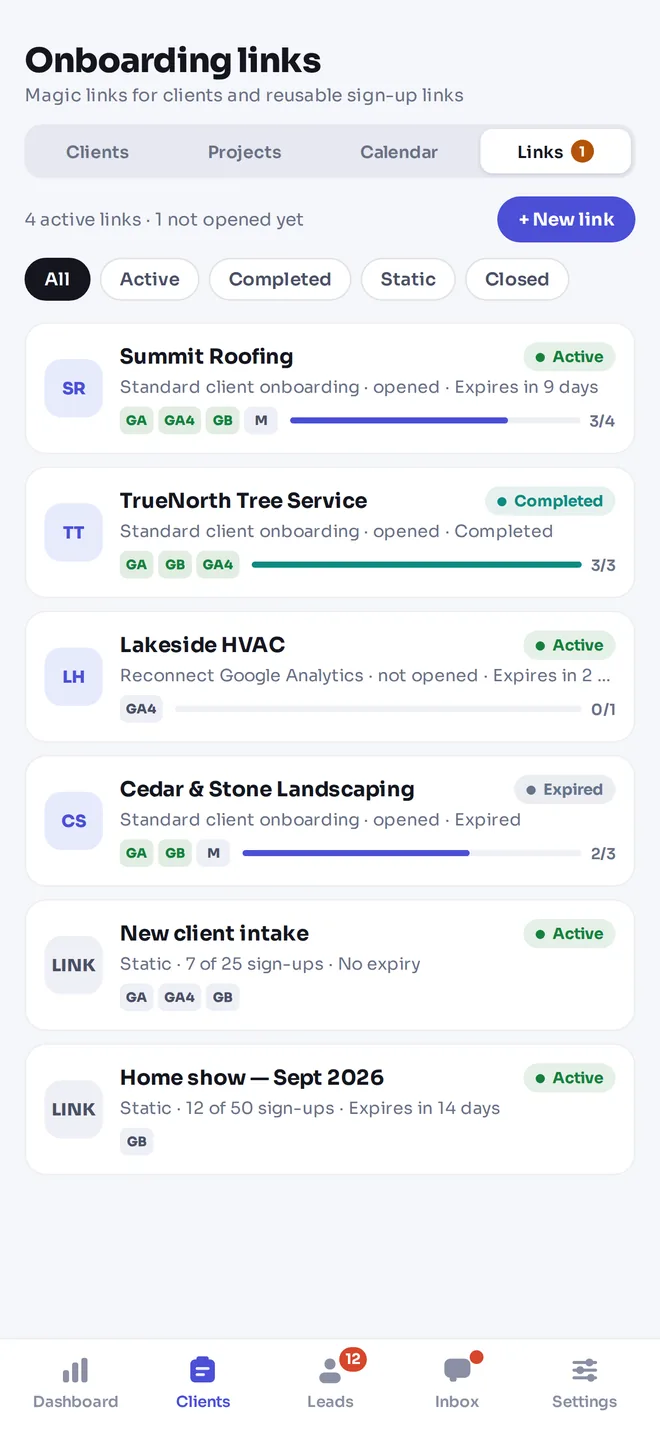
The LeadPulse app has the whole onboarding flow: see which links are active, opened or complete, and create a new link for a client in a few taps — then share it by text or email straight from the phone.

The onboarding links screen in the LeadPulse app, listing links with their status and connected platforms

The numbers

Onboarding links, in numbers

Platforms on one linkGoogle Ads, GA4, Search Console, Business Profile, Tag Manager, Merchant Center, YouTube, Meta ad accounts, Facebook Pages, TikTok Ads, LinkedIn Ads, Snapchat Ads, Shopify, plus website and hosting steps
Granted automaticallyGA4, Business Profile, Tag Manager (added); Google Ads, Merchant Center (invited); Meta ad accounts and Pages (partner assignment)
Owner accessNever requested on any platform
PasswordsNever requested
Link typesClient link (one client) or reusable link (1–10,000 sign-ups)
ExpiryNone by default; optional expiry per link
Included onEvery plan, with no per-link or per-connection charge

What this does not do

Better to find this out here than three weeks in.

  • The client page shows your agency's name and a small Powered by Agency Pilot line. It isn't white-labelled on your own domain.
  • Search Console, YouTube, TikTok, LinkedIn, Snapchat and Shopify are guided steps because those platforms don't let apps add users on a client's behalf. The link confirms the client says they've done it; the platform's own invitation or your access confirms it for real.
  • Microsoft Ads, Pinterest, X, Klaviyo, Mailchimp and HubSpot aren't on the link yet — add them as your own guided steps in the meantime.
  • It doesn't create missing ad accounts, Pages or pixels for the client; they need to exist first.

Questions

What is a client onboarding link?
A single link you send a new client that collects access to their marketing accounts — Google, Meta and others — at the access level you choose, without them sharing a password. Agency Pilot grants the access automatically where the platform allows it and guides the client through the rest.
Is it safe for my client?
Clients sign in on Google's, Meta's and each platform's own page; Agency Pilot never sees a password. Each link only asks for the permissions its platforms need, tokens are encrypted at rest, and the client can revoke access from each platform at any time.
Do I keep access if I stop using Agency Pilot?
Yes. The access your agency receives is granted inside Google, Meta and the other platforms, so it stays until the client removes it. Only Agency Pilot's reporting connection ends.
Can a prospect use a link before they sign?
Yes. A reusable view-level link lets a prospect share read-only access so you can run a Business Profile audit or prospect scorecard on real data before the pitch.
Can I add more than one person from my agency?
Yes. List several Google logins or Meta Business IDs under Onboarding → Connected accounts and each is granted on the same property.
What if the client's login can see several properties?
Nothing is granted until someone chooses. The client picks the right property on the link, or you pick it under Connected accounts.
How is this different from Leadsie?
The access part is similar. The difference is that the connections feed your reporting, rank tracking, attribution and client portal in the same product. See the full comparison for pricing and where each one is the better fit.

Send your first onboarding link today

Start a 14-day trial with 300 credits. Every plan includes onboarding links.